
A good gaming laptop generally costs between $1,000 and $1,500 in the United States. Within this price range, most buyers can get a modern dedicated graphics card, 16GB of RAM, fast SSD storage, a high-refresh-rate display, and enough performance to play current games smoothly at 1080p.
You can spend less if you mainly play lightweight or competitive games such as Valorant, Roblox, Minecraft, Fortnite, or League of Legends. However, gamers who want high settings, 1440p resolution, ray tracing, streaming, or better long-term performance may need to spend between $1,500 and $2,500.
The right amount depends on the games you play, your target resolution, preferred frame rate, portability needs, and how long you expect to keep the laptop. This guide explains how much a good gaming laptop costs, what specifications you should receive at each price, and how to avoid paying for features you do not need.
How Much Is a Good Gaming Laptop? Quick Answer
For most people, the gaming laptop price ranges below provide a practical starting point.
| Gaming Laptop CategoryTypical US PriceBest For | ||
|---|---|---|
| Basic or entry-level | $600–$900 | Lightweight games and esports |
| Good budget model | $900–$1,200 | 1080p gaming at moderate settings |
| Best-value mid-range | $1,200–$1,500 | Modern games at 1080p high settings |
| Upper mid-range | $1,500–$2,000 | High-refresh 1080p and 1440p gaming |
| High-end | $2,000–$3,000 | Premium 1440p gaming and content creation |
| Enthusiast | $3,000+ | Maximum performance, premium displays, and desktop replacement use |
The $1,000–$1,500 range is the sweet spot for most gamers. Current US listings include gaming laptops below $1,000 with older or lower-tier GPUs, while RTX 5060 and RTX 5070 configurations commonly appear between roughly $1,400 and $1,700, depending on the display, processor, RAM, storage, brand, and discounts.
Prices change frequently, so treat these figures as buying ranges rather than fixed prices.
What Makes a Gaming Laptop Good?
A gaming laptop is not good simply because its product name includes the word “gaming.” A well-balanced model should provide suitable performance, cooling, display quality, storage, and long-term usability for its price.
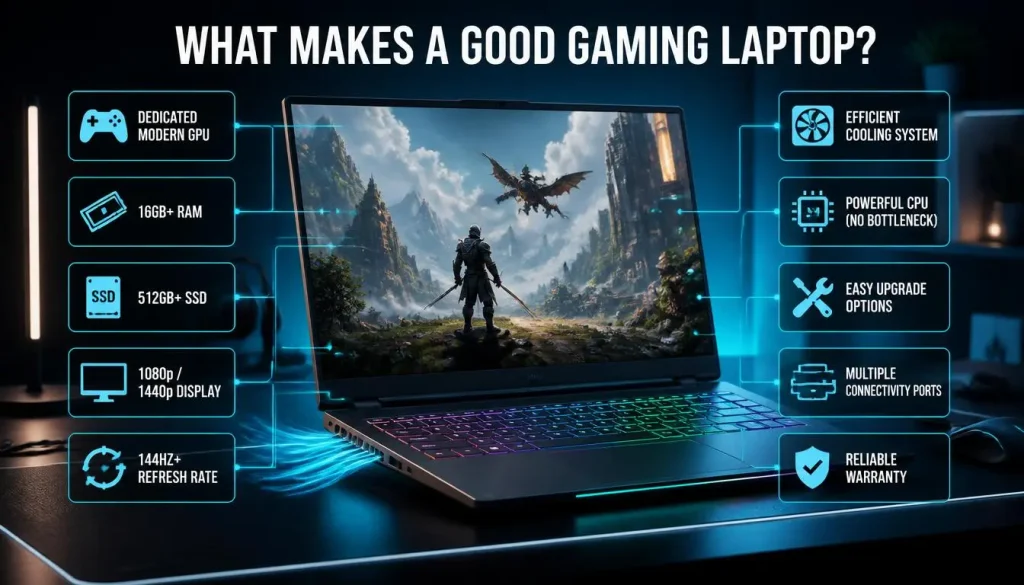
For most buyers, a good gaming laptop should have:
- A dedicated modern graphics card
- At least 16GB of system RAM
- At least 512GB of SSD storage
- A 1080p or 1440p display
- A refresh rate of 144Hz or higher
- Effective cooling under sustained gaming loads
- A processor that does not limit the GPU
- Reasonable upgrade options
- A useful selection of ports
- A reliable warranty and return policy
The processor and graphics card should be powerful enough to produce consistent frame rates at the laptop display’s native resolution. The display, form factor, battery life, storage, and portability should also match how you plan to use the machine.
The most expensive laptop is not automatically the best choice. A properly cooled $1,400 laptop with a balanced specification can be a better purchase than a thin $2,000 laptop that offers a premium design but limits GPU performance.
Gaming Laptop Price Ranges Explained
Gaming Laptops Under $700
New gaming laptops below $700 usually involve major compromises. They may use integrated graphics, an older entry-level dedicated GPU, only 8GB of RAM, limited storage, or a low-quality display.
A laptop in this range can still work for:
- Roblox
- Minecraft without demanding shaders
- League of Legends
- Rocket League
- Valorant
- Older PC games
- Indie games
- Cloud gaming
It may struggle with new AAA games, particularly at high settings. You may also need to upgrade the RAM or storage soon after buying it.
At this price, a professionally refurbished laptop from a reputable retailer may provide better value than a poorly equipped new model. Check the battery condition, warranty, return policy, display, keyboard, ports, fan noise, and charger before purchasing.
Gaming Laptops Between $700 and $1,000
This is the entry-level dedicated gaming category. You may find a capable laptop during a major sale, but careful comparison is necessary.
A good deal in this range should ideally include:
- A dedicated entry-level GPU
- 16GB of RAM
- A 512GB SSD
- A 1080p display
- A refresh rate between 120Hz and 165Hz
- Upgradeable RAM or storage
These laptops are generally best for 1080p gaming at low, medium, or optimized settings. Competitive games may run at high frame rates, while demanding AAA games may require reduced settings, upscaling, or frame-generation features.
Avoid paying close to $1,000 for a model with 8GB of non-upgradeable RAM, a dim 60Hz screen, or only 256GB of storage.
Gaming Laptops Between $1,000 and $1,500
This is the best price range for most buyers.
A good laptop in this category should usually offer:
- A modern mid-range or strong entry-level GPU
- 16GB of RAM
- A 512GB or 1TB SSD
- A 144Hz or 165Hz display
- Good 1080p performance
- Usable cooling
- Better build quality than entry-level models
- Some RAM or storage upgradeability
This range is suitable for students, everyday gamers, competitive players, and people who want to play current games without paying for premium components.
Expect smooth 1080p performance in most titles when the graphics settings are matched to the GPU. Some models can also handle 1440p gaming, particularly with intelligent upscaling.
Gaming Laptops Between $1,500 and $2,000
This category is appropriate for buyers who want more performance, a better screen, stronger cooling, or a more premium design.
Common improvements include:
- A stronger GPU
- Higher GPU power limits
- A 1440p or 1600p display
- Better color accuracy
- Brighter panels
- Higher refresh rates
- 1TB of storage
- 24GB or 32GB of RAM
- Better cooling
- Improved keyboards and build quality
This is a sensible budget for 1440p gaming, streaming, video editing, 3D work, and demanding multitasking.
However, not every $1,800 laptop offers better gaming performance than every $1,400 model. Slim designs, premium materials, OLED displays, and portability can increase the price without increasing frame rates proportionally.
Gaming Laptops Over $2,000
High-end gaming laptops are designed for enthusiasts, creators, and users looking for a desktop replacement.
They may include:
- Upper-tier graphics cards
- High-performance processors
- 32GB or more RAM
- 1TB or 2TB SSDs
- OLED or mini-LED displays
- Advanced cooling systems
- High-resolution, high-refresh-rate panels
- Premium metal construction
- Better speakers and connectivity
These features can be valuable, but performance per dollar normally decreases at the premium end. Spending twice as much does not necessarily produce twice the frame rate or twice the useful lifespan.
A high-end laptop makes sense when you specifically need premium 1440p performance, content-creation power, a better screen, or a machine that replaces both a gaming PC and a work laptop.
Is Your Budget Enough for a Good Gaming Laptop?
Is $500 Enough for a Gaming Laptop?
A $500 budget is generally not enough for a strong new gaming laptop. At this price, most machines rely on integrated graphics or old entry-level components.
You can still play lightweight games, older titles, and esports games at reduced settings. A used or refurbished model may offer more performance, but its battery, cooling system, warranty, and physical condition require careful inspection.
Is $700 Enough for a Gaming Laptop?
A $700 budget can be enough during a major sale, especially for entry-level 1080p gaming. Look for a dedicated GPU, upgradeable memory, and at least 512GB of storage.
You may need to reduce graphics settings in demanding games, but esports titles should generally be easier to run.
Is $800 Enough for a Gaming Laptop?
Yes, $800 can buy a useful entry-level gaming laptop. Prioritize GPU performance, 16GB of RAM, cooling, and display quality instead of paying extra for RGB lighting or a premium-looking chassis.
The laptop should be suitable for 1080p esports gaming and many modern games at carefully selected settings.
Is $1,000 Enough for a Good Gaming Laptop?
Yes. A $1,000 budget is enough for a good gaming laptop, particularly when discounts are available.
At this price, aim for:
- 16GB of RAM
- A 512GB or 1TB SSD
- A modern dedicated GPU
- A 144Hz display
- Upgradeable storage
- Proven cooling performance
Do not assume that every laptop priced at $1,000 is good value. Compare the graphics card, GPU power, screen brightness, color quality, RAM arrangement, and warranty.
Is $1,500 Enough for a Good Gaming Laptop?
Yes. A $1,500 budget is enough for a very good gaming laptop for most people.
This budget can provide excellent 1080p performance, entry-level or solid 1440p capability, a fast display, 16GB or more RAM, 1TB storage, and a stronger cooling system.
For the average gamer, spending significantly more may provide premium features rather than a dramatic improvement in everyday gameplay.
Is $2,000 Too Much for a Gaming Laptop?
A $2,000 gaming laptop is not necessarily excessive, but it should offer clear advantages over less expensive alternatives.
At this price, expect some combination of:
- Strong 1440p performance
- A high-quality OLED, mini-LED, or bright IPS display
- 32GB of RAM
- A 1TB or larger SSD
- Better cooling
- Strong build quality
- A higher-tier GPU
- A reliable warranty
It is too much when the additional cost mainly pays for branding, cosmetic design, or portability that you do not need.
How Much Should You Spend for Your Target Frame Rate?
Frame rate depends on the game, graphics settings, resolution, cooling, GPU power, processor, RAM configuration, and whether technologies such as upscaling or frame generation are enabled.
The following ranges are practical estimates rather than guaranteed results.
| Gaming Target | Suggested Budget | Typical Use |
|---|---|---|
| 1080p at around 60 FPS | $700–$1,000 | Medium or optimized settings |
| 1080p at 100–144 FPS | $1,000–$1,500 | Esports and less demanding games |
| 1080p high or ultra settings | $1,200–$1,700 | Modern AAA gaming |
| 1440p at around 60–100 FPS | $1,500–$2,000 | High-quality single-player gaming |
| 1440p at high refresh rates | $1,800–$2,500 | Premium competitive and AAA gaming |
| 4K gaming | $2,500–$3,500+ | Enthusiast use with performance compromises |
A 240Hz display does not automatically mean every game will run at 240 FPS. The GPU must generate enough frames to take advantage of the refresh rate.
Competitive games are usually easier to run at high frame rates than graphically demanding single-player games. Current retailer specifications also demonstrate how different GPU power limits and configurations can produce very different frame-rate claims, even within similar product categories.
How Much Should You Spend Based on the Games You Play?
Esports and Competitive Games
Recommended budget: $700–$1,200
This category includes games such as:
- Valorant
- Counter-Strike 2
- League of Legends
- Rocket League
- Overwatch
- Rainbow Six Siege
- Fortnite in competitive settings
Prioritize a strong processor, a high-refresh-rate display, low input latency, and stable frame rates. A 1080p screen is often more practical than a high-resolution display for competitive gaming.
Modern AAA Games
Recommended budget: $1,100–$1,800
This range is suitable for demanding games with detailed environments, advanced lighting, and large open worlds.
The best balance usually comes from a capable GPU, 16GB or 32GB of RAM, 1TB of storage, and a 1080p or 1440p display.
Do not purchase based only on advertised “ultra settings.” High settings often look nearly identical while providing noticeably better performance.
1440p Gaming
Recommended budget: $1,500–$2,300
For 1440p gaming, the graphics card becomes especially important. Look for sufficient VRAM, strong cooling, and a GPU power limit that allows sustained performance.
Upscaling can improve frame rates, but it should complement capable hardware rather than compensate for a severely underpowered GPU.
4K Gaming
Recommended budget: $2,500–$3,500 or more
Native 4K gaming is demanding, especially with ray tracing enabled. Even expensive laptops may need upscaling, frame generation, or reduced settings in the most demanding games.
A 4K laptop screen also increases cost and power consumption. On a smaller display, a good 1440p or 1600p panel may provide a better balance of sharpness and performance.
Gaming, Streaming, and Content Creation
Recommended budget: $1,500–$2,500
Streaming and creative work benefit from:
- A capable multi-core processor
- A modern GPU with hardware encoding
- At least 16GB of RAM
- Preferably 32GB for heavier workloads
- A 1TB or larger SSD
- A color-accurate display
- Strong cooling
Modern RTX laptop GPUs also include features designed for gaming and creative applications, including ray tracing, AI-assisted rendering, NVIDIA Studio support, and current DLSS technologies.
How Much Does a Gaming Laptop Cost by GPU Tier?
Entry-Level Gaming GPU Laptops
Typical US price: $700–$1,200
These laptops are best for esports, indie games, older games, and modern titles at 1080p with moderate settings.
They provide a lower purchase price but may require graphics-setting reductions sooner as games become more demanding.
Mid-Range Gaming GPU Laptops
Typical US price: $1,100–$1,700
This is the best-value GPU category for most buyers. It is suitable for high-quality 1080p gaming and some 1440p gaming.
A balanced mid-range model can remain useful longer than an extremely cheap laptop because it offers more performance headroom.
Upper Mid-Range Gaming GPU Laptops
Typical US price: $1,600–$2,400
These laptops target high-refresh 1080p, strong 1440p performance, streaming, and creative workloads.
At this level, compare the screen, cooling, GPU power, processor, and build quality carefully. The same GPU can appear in both value-oriented and premium laptops with significantly different total prices.
High-End Gaming GPU Laptops
Typical US price: $2,300–$4,000+
High-end machines target premium 1440p, demanding ray-traced games, creative workloads, and desktop replacement use.
They often provide more VRAM and stronger performance, but they are heavier, more expensive, and less upgradeable than a similarly priced desktop.
What Specifications Should You Get for Your Budget?
| Budget | GPU Target | RAM | Storage | Display Target |
|---|---|---|---|---|
| Under $800 | Entry-level dedicated GPU | 16GB preferred | 512GB | 1080p, 120Hz–144Hz |
| $800–$1,200 | Strong entry-level GPU | 16GB | 512GB–1TB | 1080p, 144Hz+ |
| $1,200–$1,700 | Mid-range GPU | 16GB–32GB | 1TB | 1080p or 1440p |
| $1,700–$2,500 | Upper mid-range GPU | 32GB optional | 1TB+ | 1440p, high refresh |
| $2,500+ | High-end GPU | 32GB+ | 1TB–2TB | Premium 1440p or 4K |
These targets are guidelines. A less expensive laptop with a stronger GPU and adequate cooling may outperform a more expensive model with a premium display and thinner chassis.
What Specifications Should a Good Gaming Laptop Have?
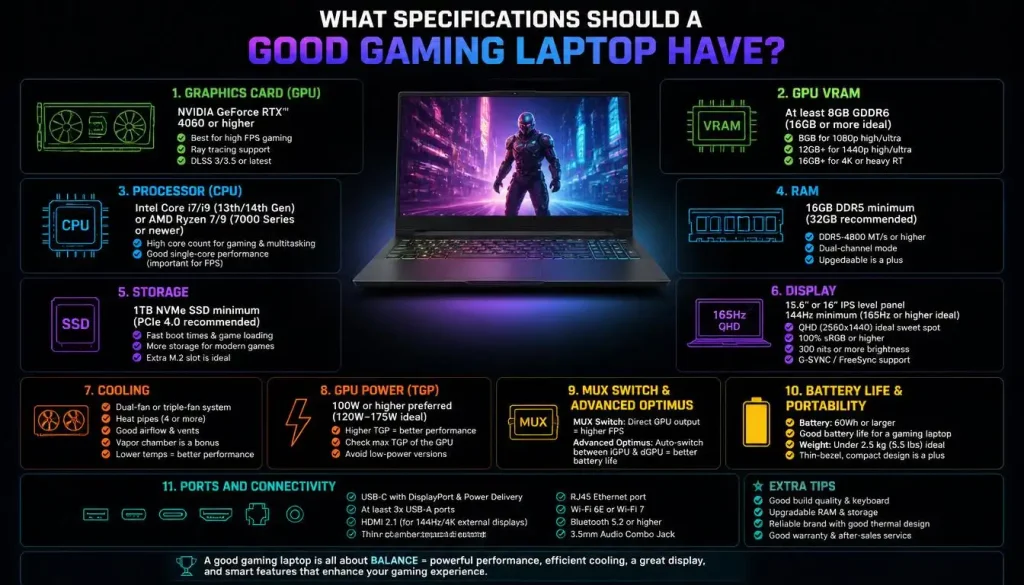
Graphics Card
The GPU is usually the most important component for gaming performance. It controls how quickly the laptop can render detailed scenes, shadows, lighting effects, textures, and high-resolution images.
Check:
- The exact GPU model
- The amount of VRAM
- GPU power or TGP
- Real gaming benchmarks
- Thermal performance
- Supported upscaling and frame-generation features
Do not compare laptops using the GPU name alone. Performance can vary with power limits, cooling, processor choice, memory configuration, and manufacturer tuning. NVIDIA’s own laptop performance information identifies specific TGP values and warns that performance varies by laptop model and configuration.
VRAM
VRAM is the dedicated memory used by the graphics card. It is different from regular system RAM.
More demanding textures, higher resolutions, ray tracing, and certain creative applications can use more VRAM.
As a general guide:
- 6GB can work for entry-level 1080p gaming
- 8GB is a more comfortable target for mainstream buyers
- 12GB or more is useful for demanding 1440p gaming and heavier creative work
VRAM alone does not determine performance. A weak GPU with more VRAM can still be slower than a stronger GPU with less.
Processor
A good gaming laptop needs a processor capable of supporting the GPU without becoming a major performance bottleneck.
For most buyers, a modern Core 5, Core i5, Ryzen 5, or equivalent processor can be sufficient. A Core 7, Core i7, Ryzen 7, or higher-tier chip may be useful for:
- High-refresh competitive gaming
- Streaming
- Video editing
- 3D rendering
- Heavy multitasking
- CPU-intensive simulation or strategy games
Do not sacrifice a much stronger graphics card solely to obtain the highest processor tier. Gaming performance normally benefits more from a balanced CPU-and-GPU combination.
RAM
A good gaming laptop should have at least 16GB of RAM.
Eight gigabytes may still run some games, but it can create limitations when Windows, background applications, browsers, voice chat, and the game are running together.
Choose 32GB when you regularly stream, edit video, use professional software, run virtual machines, or keep many demanding applications open.
Also check whether the RAM is:
- Upgradeable
- Soldered to the motherboard
- Installed in one module or two
- Running in the intended memory configuration
Storage
A 512GB SSD is the practical minimum, but 1TB is preferable for most gamers.
After Windows, applications, updates, and recovery files, a 512GB drive can fill quickly. Large modern games may require substantial storage, and keeping too little free space can make storage management frustrating.
Look for:
- An NVMe SSD
- At least 512GB capacity
- A second SSD slot
- Easy access for upgrades
- Clear warranty rules regarding user upgrades
An NVMe SSD also provides faster startup and loading than traditional hard drives.
Display
A good display improves the experience even when it does not increase frame rates.
For most buyers, look for:
- 1080p, 1200p, 1440p, or 1600p resolution
- At least a 144Hz refresh rate
- Reasonable brightness
- Good color coverage
- Fast pixel response
- Adaptive synchronization when available
A 1080p or 1200p display is easier for an entry-level GPU to drive. A 1440p or 1600p display looks sharper but requires more graphics power.
OLED panels offer excellent contrast and response times, while good IPS panels can offer strong brightness, color, and value. Mini-LED displays can provide high brightness and improved local contrast but often raise the price.
Cooling and GPU Power
Cooling is one of the most overlooked gaming laptop specifications.
A laptop may contain a powerful GPU but fail to sustain its expected performance if the cooling system cannot control temperatures. Excessive heat can lead to higher fan noise, reduced clock speeds, and inconsistent gaming performance.
Before buying, check independent reviews for:
- Sustained gaming temperatures
- Fan noise
- Keyboard surface temperature
- GPU power under load
- Performance modes
- Thermal throttling
A thicker, less glamorous model may outperform a premium thin laptop because it has more cooling capacity.
MUX Switch and Advanced Optimus
Many gaming laptops contain both integrated graphics and a dedicated GPU.
A MUX switch allows the display path to change between integrated and dedicated graphics. Dedicated GPU mode can improve gaming performance or reduce latency in certain situations, while hybrid mode can preserve battery life.
Advanced Optimus can perform this switching automatically on compatible systems, helping balance performance, latency, and battery efficiency.
A MUX switch is useful, but it should not be prioritized over the GPU, cooling, display quality, and price.
Battery Life and Portability
Gaming laptops normally provide their best performance while connected to the charger. Battery-powered gaming may reduce performance and drain the battery quickly.
Consider:
- Laptop weight
- Charger size and weight
- Everyday battery life
- USB-C charging support
- Fan noise during light work
- Whether the laptop fits your bag
- Whether you travel frequently
A compact 14-inch model may cost more than a larger laptop with similar performance because buyers are paying for portability, engineering, materials, and a smaller chassis.
Ports and Connectivity
A useful gaming laptop should provide enough ports for your peripherals.
Look for:
- USB-A
- USB-C
- HDMI
- Ethernet
- Headphone and microphone support
- Display output through USB-C
- Wi-Fi 6, Wi-Fi 6E, or newer connectivity
- A suitable charging connection
Check where the ports are located. Rear-facing display, Ethernet, and power connections can help keep a permanent desk setup organized.
Laptop GPU vs Desktop GPU
A laptop GPU and a desktop GPU with similar names should not be assumed to offer identical performance.
Laptop GPUs operate within tighter limits involving:
- Power consumption
- Cooling
- Physical space
- Battery capacity
- Chassis thickness
- Fan size
Two laptops with the same GPU can also perform differently because one may allow a higher power limit or maintain lower temperatures.
Always compare laptop-specific gaming benchmarks. Do not use a desktop graphics-card review to predict the exact performance of a laptop GPU.
Gaming Laptop Prices in the USA, UK, Canada, and Australia
Laptop prices vary by region because of currency values, taxes, import costs, product availability, warranties, retailer competition, and local promotions.
United States
Typical price ranges:
- Entry-level: $700–$1,000
- Good mid-range: $1,000–$1,500
- Upper mid-range: $1,500–$2,000
- Premium: $2,000–$3,500+
Current US retailer listings show that sale prices can place RTX 4050-class machines below $1,000, while RTX 5060 and RTX 5070 models can range from approximately $1,400 to more than $2,000 depending on the overall configuration.
Remember that advertised US prices may not include applicable state or local sales tax.
United Kingdom
Typical price ranges:
- Entry-level: £700–£1,000
- Good mid-range: £1,000–£1,500
- Upper mid-range: £1,500–£2,000
- Premium: £2,000–£3,000+
Current UK listings include RTX 5050 laptops with 16GB of RAM and 1TB SSDs at approximately £1,079–£1,199, while stronger RTX 5070 Ti configurations can cost around £2,599.
UK retail prices normally include applicable VAT, although business listings may display both excluding-VAT and including-VAT figures.
Canada
Typical price ranges:
- Entry-level: C$1,000–C$1,500
- Good mid-range: C$1,400–C$2,300
- Upper mid-range: C$2,300–C$3,000
- Premium: C$3,000–C$5,000+
A current Canadian RTX 5050 laptop with 16GB of RAM and a 1TB SSD has been listed at approximately C$1,399, while RTX 5070 and RTX 5070 Ti configurations can exceed C$2,600 and C$2,900.
Canadian checkout totals can vary because sales taxes differ by province.
Australia
Typical price ranges:
- Entry-level: A$1,500–A$2,200
- Good mid-range: A$2,100–A$3,200
- Upper mid-range: A$3,200–A$4,500
- Premium: A$4,500–A$6,500+
Recent Australian listings include an RTX 5060 laptop at a sale price of approximately A$2,174 and an RTX 5070 laptop at approximately A$2,999. Premium RTX 5070 Ti systems can cost A$4,499 or more.
Australian advertised consumer prices generally include applicable GST.
Do not compare countries by currency conversion alone. Regional warranty coverage, included taxes, retailer promotions, keyboard layouts, and model availability can produce meaningful differences.
How Much Should Different Types of Buyers Spend?
Casual Gamers
Recommended budget: $700–$1,000
Casual gamers do not need to pay for premium GPUs or displays. A capable entry-level model can handle lightweight games, older titles, and many popular multiplayer games.
Competitive Gamers
Recommended budget: $900–$1,500
Competitive players should prioritize stable frame rates, a responsive display, good cooling, and low latency.
A fast 1080p panel may be more useful than a high-resolution screen that places additional demand on the GPU.
AAA Game Players
Recommended budget: $1,200–$1,800
This range offers a better balance for visually demanding games. Aim for a capable GPU, 16GB or more RAM, 1TB storage, and a good cooling system.
Students Who Also Game
Recommended budget: $900–$1,500
Students should consider more than gaming performance.
Important factors include:
- Battery life during classes
- Weight
- Charger size
- Webcam quality
- Keyboard comfort
- Fan noise
- Build quality
- USB-C charging
- Warranty support
A slightly slower but lighter laptop may be a better overall purchase than a heavy desktop replacement.
Streamers and Content Creators
Recommended budget: $1,500–$2,500
Aim for 32GB of RAM when possible, a strong multi-core processor, 1TB or more storage, hardware encoding support, and a color-accurate display.
Enthusiast Gamers
Recommended budget: $2,000–$3,500+
Enthusiasts may value premium displays, advanced cooling, high-end GPUs, mechanical-style keyboards, larger screens, or desktop replacement performance.
The additional cost is justified only when those features match a real requirement.
How to Tell Whether a Gaming Laptop Is Worth the Price
To judge value, compare the complete machine rather than one headline specification.
Review the following:
- GPU model and power limit
- Real gaming benchmarks
- Processor performance
- Sustained temperatures
- Fan noise
- RAM amount and upgradeability
- SSD capacity and expansion options
- Display brightness and color quality
- Build quality
- Battery life
- Warranty
- Competing models at the same price
A laptop with a better display, cooling system, keyboard, and warranty may be worth paying more for even when raw frame rates are similar.
However, a premium logo or aggressive design does not automatically justify a higher price.
Is a Cheap Gaming Laptop Worth It?
A cheap gaming laptop can be worth buying when it meets your actual performance needs and avoids major hidden compromises.
It is a good purchase when it has:
- A capable dedicated GPU
- 16GB of RAM or an affordable upgrade path
- At least 512GB of storage
- A usable 144Hz display
- Acceptable cooling
- A clear return policy
It may be poor value when it includes:
- Only 8GB of soldered RAM
- A dim or low-quality screen
- A severely limited GPU
- Weak cooling
- Only 256GB of storage
- No upgrade options
- Poor warranty support
The cheapest option can become expensive if you immediately need to add RAM, replace the SSD, buy a larger charger, or replace the laptop earlier than expected.
Do You Really Need a Gaming Laptop?
A regular laptop can run lightweight games, browser games, older titles, and some esports games. However, it may not offer the dedicated graphics power or cooling required for demanding modern games.
A gaming laptop is more appropriate when you need:
- A dedicated GPU
- High-refresh gaming
- Better sustained cooling
- Stronger performance in demanding games
- Hardware support for streaming or creative work
- Portable PC gaming
A regular laptop may be better when your priorities are:
- Long battery life
- Low weight
- Quiet operation
- Office work
- Web browsing
- Media consumption
- Occasional light gaming
Gaming laptops are often heavier, louder, and less battery-efficient than ordinary productivity laptops.
Gaming Laptop vs Gaming Desktop
| Factor | Gaming Laptop | Gaming Desktop |
|---|---|---|
| Portability | Excellent | Poor |
| Performance per dollar | Lower | Higher |
| Upgradeability | Limited | Excellent |
| Built-in screen | Yes | No |
| Built-in keyboard and battery | Yes | No |
| Repairability | Usually limited | Usually better |
| Desk space | Lower | Higher |
| Maximum performance | Limited by mobile design | Higher potential |
A gaming laptop is the better choice when portability matters. A desktop is usually the better choice when you want maximum performance, easy upgrades, easier repairs, and better long-term value.
Intel similarly identifies portability as a major laptop advantage and customization and upgradeability as major desktop advantages.
New vs Used vs Refurbished Gaming Laptops
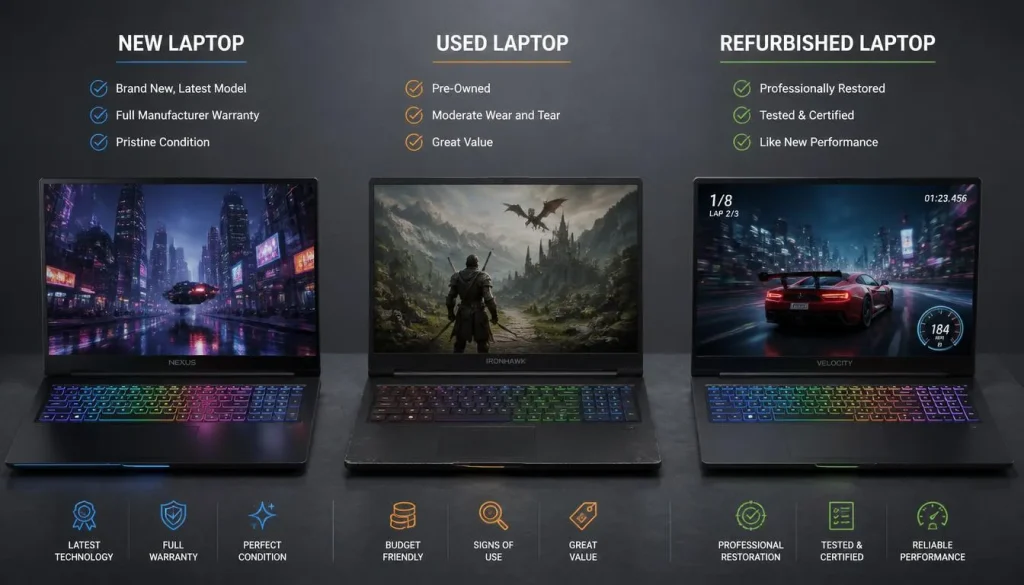
New Gaming Laptop
A new laptop provides the lowest ownership risk. You receive a full warranty, a fresh battery, a complete return period, and the latest available hardware.
The disadvantage is the higher purchase price.
Used Gaming Laptop
A used model may offer strong performance for less money, but it carries more risk.
Check:
- Battery health
- Screen condition
- Keyboard and trackpad
- Charging port
- Fans and vents
- Gaming temperatures
- SSD health
- Original charger
- Warranty status
- Signs of liquid or impact damage
Avoid paying a premium for an old flagship GPU simply because it was once high-end.
Refurbished Gaming Laptop
A reputable refurbished laptop can provide a useful balance between price and risk.
Choose a seller that clearly states:
- Who performed the refurbishment
- The cosmetic grade
- Battery standards
- Included accessories
- Warranty length
- Return period
A retailer-certified refurbished laptop is generally safer than an unknown marketplace listing.
How Long Should a Good Gaming Laptop Last?
A good gaming laptop can remain physically usable for approximately four to six years when it is maintained properly. Its ability to run new games at high settings may decline earlier as software becomes more demanding.
A budget laptop may need reduced graphics settings after a few years. A balanced mid-range laptop often provides better long-term value because it begins with more performance headroom.
Factors that affect lifespan include:
- Cooling quality
- Operating temperatures
- Dust buildup
- Battery wear
- Hinge and chassis quality
- GPU performance
- Available VRAM
- RAM capacity
- Storage capacity
- Upgradeability
You can extend useful life by cleaning the vents, keeping the laptop on a hard surface, avoiding blocked airflow, updating drivers carefully, and replacing or adding storage when necessary.
Cost per Year
| Purchase Price | Useful Period | Approximate Cost per Year |
|---|---|---|
| $900 | 3 years | $300 |
| $1,400 | 5 years | $280 |
| $2,000 | 5 years | $400 |
| $3,000 | 6 years | $500 |
This example shows why the cheapest laptop is not always the least expensive long-term choice. However, a premium laptop does not automatically provide the lowest cost per year.
Hidden Ownership and Upgrade Costs
The purchase price may not represent the full cost of owning a gaming laptop.
Possible additional expenses include:
- RAM upgrade
- Larger SSD
- Gaming mouse
- Headset
- External monitor
- Laptop stand
- Cooling pad
- Docking station
- Replacement charger
- Extended warranty
- Accidental damage protection
- Game subscriptions
- Cloud storage
- Shipping
- Taxes
Prioritize essential hardware before accessories. A better GPU, display, or cooling system is usually more important than an expensive mouse, RGB stand, or decorative accessory.
Warranty and Repair Costs
Gaming laptops can be expensive to repair because the CPU and GPU are usually attached to the motherboard.
Before purchasing, check:
- Standard warranty length
- Accidental damage options
- Battery warranty
- Dead-pixel policy
- Return period
- International warranty coverage
- Availability of authorized repair centers
- Replacement charger cost
- Whether opening the laptop affects the warranty
- Whether RAM and storage upgrades are permitted
Also investigate parts availability. Replacing a proprietary charger, display, fan, keyboard, or motherboard may be difficult after the model is discontinued.
When Is the Best Time to Buy a Gaming Laptop?
Good deals often appear during:
- Black Friday
- Cyber Monday
- Back-to-school sales
- Holiday promotions
- Clearance events
- Retailer anniversary sales
- The period following a new GPU or processor launch
Previous-generation laptops can offer excellent value after newer models arrive. However, compare real performance instead of assuming that a new generation is always faster or that an old model is automatically a bargain.
Watch the actual selling price for several weeks when possible. A large advertised discount is not meaningful when the original price was artificially high.
How to Get the Best Gaming Laptop for Your Budget
Follow this buying process:
- Set your maximum total budget, including taxes and upgrades.
- List the games you play most often.
- Choose your target resolution and frame rate.
- Prioritize the graphics card.
- Confirm the GPU power limit and cooling quality.
- Choose at least 16GB of RAM.
- Aim for a 1TB SSD when the budget permits.
- Check independent display and thermal testing.
- Compare at least three similarly priced laptops.
- Read the warranty and return conditions.
- Check whether RAM and storage can be upgraded.
- Buy based on total value rather than brand name.
Because the CPU and GPU normally cannot be replaced easily in a laptop, choose enough performance headroom for your expected games and target resolution.
Common Gaming Laptop Buying Mistakes
Choosing the Processor and Ignoring the GPU
A high-end processor cannot compensate for a weak graphics card in most graphically demanding games.
Ignoring GPU Power
Two laptops with the same GPU name may perform differently because of different power limits and cooling systems.
Buying Only 8GB of RAM
Eight gigabytes can create limitations in modern multitasking and gaming. Choose 16GB or confirm that an affordable upgrade is possible.
Underestimating Storage Needs
A 256GB SSD is rarely practical for a gaming machine. Even 512GB can fill quickly.
Ignoring the Display
A fast laptop can still feel disappointing when paired with a dim, washed-out, or slow screen.
Paying for an Unnecessary 4K Display
A 4K panel increases cost and places more demand on the GPU. A high-quality 1440p or 1600p screen is often a better match for a laptop.
Overlooking Cooling and Fan Noise
Gaming laptops operate under sustained load. Poor cooling can reduce performance and produce distracting noise.
Assuming Thin Means Better
A thinner laptop may be easier to carry, but it can have less cooling capacity, fewer ports, lower GPU power, and a higher price.
Ignoring Upgradeability
Check whether the RAM is soldered and whether a second SSD slot is available.
Buying Based Only on Brand
Every major manufacturer produces both good and poor-value configurations. Evaluate the exact model rather than relying on the brand name.
Final Verdict: How Much Should You Pay for a Good Gaming Laptop?
For most buyers, a good gaming laptop costs between $1,000 and $1,500 in the United States.
This price range normally offers the best balance of:
- Modern 1080p gaming performance
- 16GB of RAM
- Fast SSD storage
- A high-refresh-rate display
- Reasonable cooling
- Useful long-term performance
Spend between $700 and $1,000 when you mainly play esports, lightweight games, or older titles.
Spend between $1,500 and $2,000 when you want stronger 1440p performance, better cooling, a premium display, streaming capability, or improved creative performance.
Consider spending more than $2,000 only when you specifically need high-end graphics, premium construction, a professional-quality display, or desktop replacement performance.
The best gaming laptop is not the most expensive one. It is the model that delivers the performance you need without forcing you to pay for features you will rarely use.
Frequently Asked Questions
What Is a Good Price for a Gaming Laptop?
A good price is approximately $1,000–$1,500 for most buyers. This range provides a useful balance of graphics performance, memory, storage, display quality, and cooling.
Is $1,000 Enough for a Good Gaming Laptop?
Yes. A $1,000 laptop can provide good 1080p gaming, especially during a sale. Look for a dedicated GPU, 16GB of RAM, at least 512GB of storage, and a 144Hz display.
Is $1,500 Too Much for a Gaming Laptop?
No. A $1,500 budget is reasonable for someone who wants strong 1080p performance, some 1440p capability, better cooling, and improved long-term usability.
Can a $500 Laptop Run Modern Games?
A $500 laptop may run lightweight games and some modern titles at low settings, but it is unlikely to provide consistently good performance in demanding AAA games.
How Much Should a Beginner Spend on a Gaming Laptop?
A beginner should normally spend between $800 and $1,200. This is enough to experience PC gaming without paying for high-end components that may not be necessary.
How Much RAM Does a Good Gaming Laptop Need?
A good gaming laptop should have at least 16GB of RAM. Choose 32GB for streaming, editing, professional applications, or heavy multitasking.
How Much VRAM Does a Gaming Laptop Need?
Six gigabytes can work for entry-level 1080p gaming, while 8GB is a more comfortable mainstream target. Twelve gigabytes or more can help with demanding 1440p games and creative workloads.
Is 512GB Enough for a Gaming Laptop?
A 512GB SSD is usable but may fill quickly. A 1TB SSD is a better target for most gamers, especially when multiple large games will be installed.
Is an Expensive Gaming Laptop Worth It?
It can be worth it when you need a premium screen, high-end graphics, better cooling, stronger creative performance, or a desktop replacement. It is not worthwhile when you only play lightweight games.
Should I Buy a Gaming Laptop or Desktop?
Choose a laptop when portability is important. Choose a desktop when you want better performance per dollar, easier upgrades, and greater repairability.
Are Refurbished Gaming Laptops Worth Buying?
Yes, when they are sold by a reputable retailer with a clear warranty, return period, battery standard, and accurate condition description.
How Long Does a Gaming Laptop Last?
A well-maintained gaming laptop can remain physically usable for four to six years. You may need to lower graphics settings as new games become more demanding.
How Much Is a Good Gaming Laptop in the UK?
A good mid-range gaming laptop in the UK generally costs between £1,000 and £1,500. Premium configurations can exceed £2,000.
How Much Is a Good Gaming Laptop in Canada?
A good mid-range model in Canada generally costs between C$1,400 and C$2,300, depending on hardware, taxes, and promotions.
How Much Is a Good Gaming Laptop in Australia?
A good mid-range gaming laptop in Australia generally costs between A$2,100 and A$3,200. Premium configurations can cost A$4,500 or more.

“Electronics aren’t just gadgets. They’re the invisible threads that connect our work, our play, and our world.”
I’m Julian Reed, and my obsession with tech started at age twelve, when I soldered a defunct gaming console back to life in my bedroom. That tiny green screen taught me that technology isn’t just a black box, it’s a tool you can master.
After fifteen years as a hardware engineer and a decade reviewing consumer tech, I’ve joined this team to cut through the jargon. Whether you’re building a high-end home theater or just need a laptop that won’t lag, I’m here to help you choose the gear that truly powers your life.


