
Yes, HP laptops can be good for gaming—but only when you choose the right series and configuration. HP’s dedicated gaming laptops, particularly the Victus, OMEN, and HyperX OMEN ranges, can handle everything from casual games to demanding AAA titles. However, a standard HP laptop with basic integrated graphics may only be suitable for games such as Roblox, Minecraft, The Sims 4, or older PC titles.
The HP logo alone does not determine gaming performance. The graphics card, processor, RAM, cooling system, display, and GPU power limit matter far more than the brand name.
This guide explains which HP laptops are good for gaming, which models you should avoid, what specifications you need, and how HP compares with other gaming laptop brands.
Are HP Laptops Good for Gaming? Quick Answer
HP laptops are good for gaming when they have suitable gaming hardware. HP Victus laptops are generally designed for entry-level and mid-range gamers, while OMEN and HyperX OMEN laptops target more demanding players.
Here is the simple breakdown:
| HP Laptop Type | Gaming Capability | Best For |
|---|---|---|
| HyperX OMEN MAX | Excellent | High-end AAA gaming, competitive gaming, streaming |
| HyperX OMEN and HP OMEN | Very good to excellent | AAA games, esports, content creation |
| HP Victus | Good | Budget and mid-range 1080p gaming |
| HP Envy with dedicated graphics | Moderate | Casual gaming and creative work |
| Standard HP laptops | Limited | Light, browser-based, and older games |
| HP Chromebooks | Poor for native PC gaming | Android, browser, and cloud games |
HP combined OMEN and HyperX under the HyperX gaming brand in 2026 and introduced higher-performance models such as the HyperX OMEN MAX 16. However, OMEN, HyperX OMEN, and Victus naming may still appear across different stores and regions.
Is HP a Good Gaming Laptop Brand?
HP is a good gaming laptop brand because it offers products for multiple price and performance levels.
The Victus series gives budget-conscious buyers access to dedicated graphics, high-refresh-rate screens, and gaming-focused cooling without requiring a premium budget. OMEN and HyperX OMEN models offer stronger processors, more powerful graphics cards, higher-quality displays, and more advanced cooling.
HP gaming laptops also benefit from features such as:
- OMEN Gaming Hub performance controls
- High-refresh-rate display options
- Dedicated NVIDIA or AMD graphics
- Gaming-focused cooling systems
- Upgradeable memory and storage on selected models
- Designs suitable for both gaming and everyday work
- Wide availability in the USA, UK, Canada, and Australia
However, HP’s large product range can also create confusion. Two laptops with similar names may have very different graphics cards, display quality, RAM capacity, or cooling performance. You should therefore judge the exact configuration rather than assuming every Victus or OMEN performs the same way.
Which HP Laptops Are Good for Gaming?
The best HP laptop for gaming depends on your budget, preferred games, screen resolution, and expected frame rate.
HyperX OMEN MAX

The HyperX OMEN MAX range is intended for enthusiasts who want maximum laptop gaming performance.
These models may include high-end processors, powerful NVIDIA laptop graphics, premium OLED or high-refresh displays, and advanced cooling. They are best suited to:
- Demanding AAA games
- Competitive gaming
- High-refresh 1440p or 1600p gaming
- Ray tracing
- VR gaming
- Streaming
- Video editing and 3D work
HP’s 2026 HyperX OMEN MAX 16 configurations include options reaching high-end RTX graphics and 240Hz displays, although specifications and availability differ by country.
The disadvantages are predictable: premium pricing, heavier power adapters, shorter gaming battery life, increased fan noise, and reduced portability compared with thin productivity laptops.
HyperX OMEN and HP OMEN
OMEN laptops are strong choices for serious gamers who do not necessarily need the most expensive flagship configuration.
Depending on the model, an OMEN laptop may be suitable for:
- 1080p gaming at high frame rates
- 1440p or 1600p gaming
- Competitive esports
- Modern AAA games
- Streaming and recording
- Graphic design and video production
Current HyperX OMEN configurations include different processor, GPU, display, memory, and storage options. Some models prioritize maximum performance, while others balance gaming power with portability.
OMEN is usually the better HP choice when cooling, screen quality, sustained performance, and premium construction matter more than getting the lowest possible price.
HP Victus
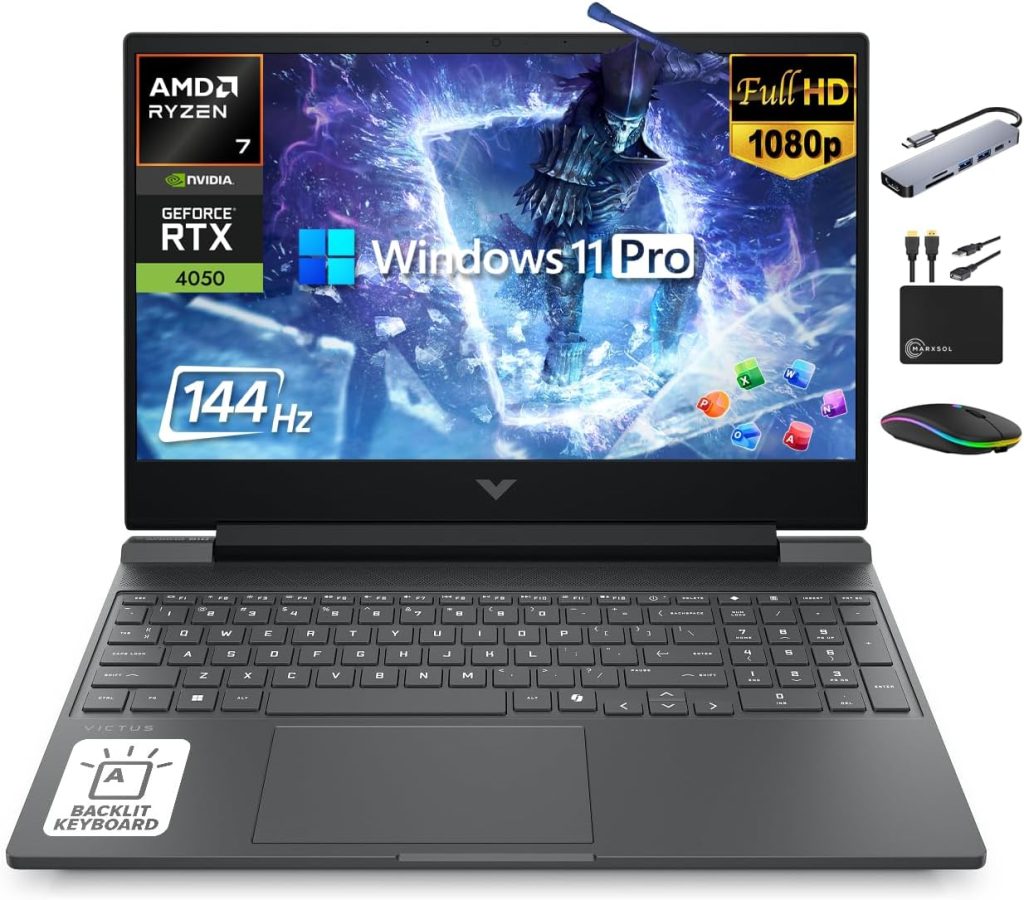
HP Victus is generally the best choice for budget-conscious and first-time gaming laptop buyers.
A properly configured Victus laptop with dedicated graphics can run:
- Fortnite
- Valorant
- Counter-Strike 2
- Overwatch 2
- Apex Legends
- GTA V
- Forza Horizon
- Call of Duty
- Many modern AAA games
Victus laptops are mainly targeted at entry-level and mid-range gaming. Current configurations can include dedicated RTX graphics and 144Hz displays, but entry models may start with only 8GB of RAM, 512GB of storage, or a basic-color display.
A Victus can offer excellent value when discounted, but buyers should check the screen, memory, GPU, and upgrade options carefully.
Regular HP Laptops With Dedicated Graphics
Some HP Envy, OmniBook, Pavilion, or creator-focused laptops include dedicated graphics cards. These models may be capable of gaming even though they are not marketed primarily as gaming laptops.
They can be useful for people who need one machine for:
- Work
- University
- Graphic design
- Video editing
- Occasional gaming
- Travel
The main limitation is cooling. A thin productivity laptop may not sustain the same graphics performance as a thicker gaming laptop, even when both appear to use a similarly named GPU.
HP Laptops With Integrated Graphics
An HP laptop without a dedicated graphics card can still run light games.
Modern integrated graphics may handle:
- Roblox
- Minecraft without demanding shaders
- League of Legends
- Valorant
- Rocket League
- The Sims 4
- Indie games
- Older PC games
- Some newer games at low settings
However, integrated graphics share system memory and usually deliver much lower performance than a dedicated gaming GPU. They are not ideal for demanding ray tracing, high-resolution gaming, or consistently high frame rates in modern AAA titles.
HP Chromebooks
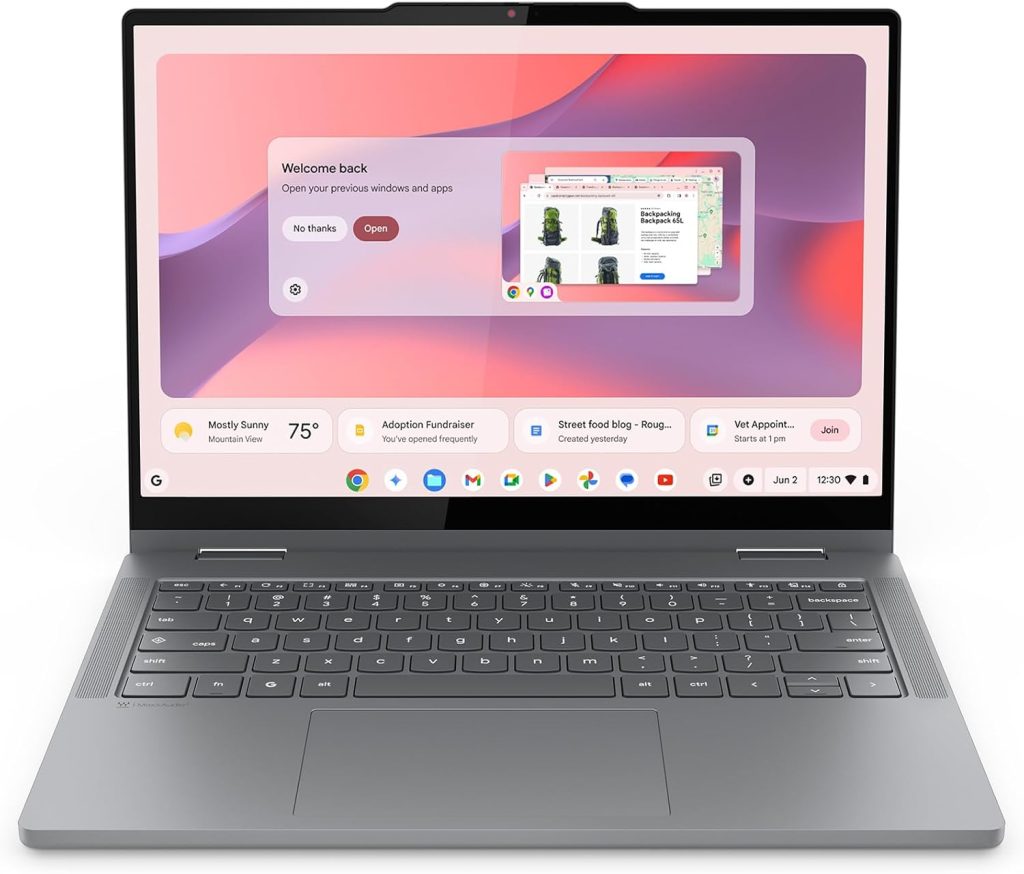
HP Chromebooks are not designed for traditional Windows PC gaming.
They are better suited to:
- Browser games
- Android games
- Game-streaming services
- Lightweight cloud-based gaming
A Chromebook may be acceptable for casual players, but it is not the right choice for someone who wants broad access to Windows games, gaming mods, professional launchers, or demanding PC titles.
Which HP Laptops Are Not Good for Gaming?
Not every HP laptop is suitable for gaming. Avoid assuming that a laptop is powerful simply because it has a Core i7, Ryzen 7, or large amount of storage.
An HP laptop may not be a good gaming choice when it has:
- A low-powered entry-level processor
- Only basic Intel UHD graphics
- 4GB or 8GB of non-upgradeable memory
- A slow or nearly full storage drive
- A 60Hz display when competitive gaming is your priority
- Weak cooling designed only for office work
- No suitable ports for your monitor or accessories
- A low-wattage charger that restricts performance
- An outdated dedicated GPU with insufficient video memory
A fast processor cannot compensate for a weak graphics card in most visually demanding games. Similarly, adding more RAM will not turn a basic office laptop into a high-performance gaming machine.
What Specifications Does an HP Laptop Need for Gaming?
The correct specifications depend on the games you play and the visual quality you expect.
Dedicated Graphics Card
The graphics card is usually the most important gaming component.
A dedicated GPU has its own video memory and is designed to process complex graphics more efficiently than integrated graphics.
For a practical buying decision, consider the following categories:
| Graphics Level | Recommended Use |
|---|---|
| Integrated graphics | Casual, indie, browser, and older games |
| Entry-level dedicated GPU | Esports and 1080p gaming at reduced settings |
| Mid-range dedicated GPU | Modern 1080p high settings and some 1440p gaming |
| High-end dedicated GPU | High-refresh 1440p, ray tracing, VR, and demanding AAA games |
Do not compare GPUs by name alone. Laptop graphics performance can change according to Total Graphics Power, cooling, processor limits, and chassis design.
HP publishes GPU performance information, including TGP data, for selected OMEN and Victus systems because two laptops with the same GPU name may operate at different power levels.
Processor
The processor affects frame-rate consistency, game physics, artificial intelligence, background applications, streaming, and simulation performance.
A modern mid-range processor is sufficient for most gamers. A more powerful processor becomes valuable when you play:
- Competitive games at very high frame rates
- Simulation games
- Strategy games
- Open-world games with complex environments
- CPU-heavy multiplayer titles
- Games while streaming or recording
Processor generation and power limits matter more than simply choosing a laptop labeled Core i7 or Ryzen 7.
RAM
For most current gaming laptops, 16GB of RAM is the practical target.
- 8GB: Acceptable for light gaming, but limiting for multitasking and newer titles
- 16GB: Recommended for most gamers
- 32GB: Useful for streaming, heavy multitasking, video editing, modded games, and professional applications
- 64GB: Usually unnecessary for gaming alone
Also check whether the laptop uses one memory module or two. Dual-channel memory can improve performance, especially when the system relies on integrated graphics.
Storage
Choose an SSD rather than a mechanical hard drive for your operating system and games.
An SSD improves:
- Startup time
- Game loading
- File transfers
- Application responsiveness
- Level and asset loading
A 512GB SSD is usable, but it can fill quickly after Windows, applications, and several large games are installed. A 1TB SSD is more comfortable for most gamers.
Before purchasing, check whether the exact HP model has an additional SSD slot or supports storage replacement.
Cooling
Gaming creates sustained heat. The processor and graphics card must maintain high power for longer periods than they would during web browsing or document editing.
A good cooling system helps prevent:
- Thermal throttling
- Sudden frame-rate drops
- Excessive surface heat
- Crashes
- Reduced long-term component stability
Thicker OMEN or HyperX OMEN systems generally provide more thermal headroom than thin productivity laptops. Victus cooling can also be effective, but it varies by model and configuration.
Display
A powerful GPU is less useful when paired with a poor screen.
Check the following:
- Resolution
- Refresh rate
- Response time
- Brightness
- Color coverage
- Adaptive refresh support
- Panel type
A 120Hz, 144Hz, or 165Hz display can make movement feel smoother than a basic 60Hz screen. Competitive players may prefer 240Hz or higher, but the laptop must generate enough frames to benefit from that refresh rate.
For most buyers, a good-quality 1080p or 1200p 144Hz display provides a sensible balance between performance and image quality.
Why the Exact HP Laptop Configuration Matters
The exact model number is more important than the product-family name.
For example, two HP Victus laptops may have:
- Different processors
- Different graphics cards
- Different GPU power limits
- 8GB or 16GB of RAM
- Single-channel or dual-channel memory
- Different display brightness
- Different color coverage
- Different battery capacities
- Different numbers of SSD slots
The same applies to OMEN and HyperX OMEN laptops. HP’s official gaming page lists multiple configurations with substantially different graphics cards, displays, memory capacities, and cooling systems.
Before buying, find the full product number and verify the specification sheet. Do not rely only on a retailer’s shortened title.
Are HP Laptops With Integrated Graphics Good for Gaming?
HP laptops with integrated graphics are good for light gaming, but they are not direct replacements for dedicated gaming laptops.
The experience depends on:
- The integrated GPU generation
- Memory capacity
- Single-channel or dual-channel memory
- Game optimization
- Screen resolution
- Graphics settings
- Cooling
- Background applications
For the best results, lower the resolution or graphics settings and disable demanding effects such as ray tracing, high-quality shadows, and advanced anti-aliasing.
An integrated-graphics laptop may be enough when you mainly play esports, indie games, or older titles. For modern AAA releases, a dedicated GPU is the safer choice.
How to Know Whether Your HP Laptop Can Run a Game
Follow these steps before purchasing or installing a game.
Find the Exact HP Model
Look for the model or product number on:
- The label underneath the laptop
- HP Support Assistant
- Windows System Information
- The original purchase receipt
- Your HP account
- The BIOS information screen
Check the Processor and RAM
In Windows:
- Open Settings.
- Select System.
- Open About.
- Review the processor and installed RAM.
Check the Graphics Card
You can find the GPU through:
- Open Task Manager.
- Select Performance.
- Choose GPU.
- Note the exact graphics name and available video memory.
You can also use Device Manager or the DirectX Diagnostic Tool.
Compare It With the Game Requirements
Check both the minimum and recommended requirements.
The minimum requirement usually means the game can start and run at low settings. The recommended requirement is a better indication of whether you will receive a comfortable experience.
Check Free Storage
A game may require additional space for:
- Installation files
- Updates
- Shader caches
- Downloadable content
- Saved games
- Temporary files
Keep extra free space beyond the publisher’s listed installation size.
What Games Can an HP Laptop Run?
The answer depends entirely on the hardware.
Minecraft
Most modern HP laptops can run standard Minecraft at modest settings. However, demanding shaders, texture packs, heavy mod collections, and high render distances require much stronger graphics hardware.
For heavily modified Minecraft, choose at least 16GB of RAM and a dedicated GPU.
Roblox
Roblox runs on many standard HP laptops. An entry-level or modern integrated GPU is normally enough for basic experiences.
More complex Roblox games, high-resolution displays, and high frame-rate targets benefit from a dedicated GPU.
Fortnite
Fortnite can run on integrated graphics using reduced settings or Performance Mode. For higher visual quality and more stable competitive frame rates, choose an HP Victus or OMEN with dedicated graphics.
A 144Hz screen is useful only when the laptop can consistently produce a high frame rate.
Valorant
Valorant is relatively accessible and can run on many modern HP laptops. Integrated graphics may be sufficient at low settings, while a dedicated GPU is preferable for high-refresh competitive play.
Processor performance becomes increasingly important when targeting very high frame rates.
GTA V
GTA V can run on many older or entry-level dedicated GPUs. Some modern integrated graphics may also run it at low settings.
Higher resolutions, graphics mods, population settings, and advanced effects require more GPU power and video memory.
Call of Duty: Warzone
Warzone is more demanding than Roblox, Minecraft, or Valorant. A dedicated graphics card, 16GB of RAM, adequate storage, and good cooling are strongly recommended.
Entry-level gaming hardware may require low settings and upscaling. Mid-range or high-end OMEN configurations are more suitable for high frame rates or increased visual quality.
Modern AAA Games
Games with complex open worlds, ray tracing, high-resolution textures, or advanced lighting require dedicated graphics.
For demanding modern titles, prioritize:
- A mid-range or better dedicated GPU
- At least 16GB of RAM
- Sufficient video memory
- A fast SSD
- Strong cooling
- Upscaling support
- A suitable power adapter
What Gaming Performance Can You Expect?
Use this table as a general guide rather than a guaranteed benchmark:
| Hardware Level | Typical Games | Expected Settings |
|---|---|---|
| Basic integrated graphics | Roblox, indie games, older titles | 720p–1080p low |
| Strong modern integrated graphics | Valorant, Minecraft, Rocket League | 1080p low–medium |
| Entry dedicated GPU | Fortnite, GTA V, esports titles | 1080p medium–high |
| Mid-range dedicated GPU | Modern AAA and competitive games | 1080p high or 1440p optimized |
| High-end dedicated GPU | AAA, ray tracing, VR, high-refresh gaming | 1440p high–ultra |
Actual performance varies according to the exact laptop, game update, graphics driver, power mode, temperature, and background applications.
HP OMEN vs HP Victus: Which Is Better?
Victus and OMEN are designed for different buyers.
| Feature | HP Victus | OMEN or HyperX OMEN |
|---|---|---|
| Target buyer | Budget and first-time gamer | Enthusiast and demanding gamer |
| Typical gaming target | 1080p | High-refresh 1080p to 1440p and beyond |
| Cooling | Good but model-dependent | More advanced on premium configurations |
| Display options | Basic to good | Good to premium |
| Build | Budget-focused | More premium |
| Portability | Model-dependent | Model-dependent |
| Price | Lower | Higher |
| Best use | Esports and affordable AAA gaming | Competitive, AAA, VR, and streaming |
Choose Victus when value is your priority and you are happy with 1080p gaming.
Choose OMEN or HyperX OMEN when you want stronger sustained performance, better display options, higher-end graphics, more advanced cooling, or a more premium experience.
HP’s own positioning describes Victus as the more accessible gaming range, while OMEN and HyperX OMEN target higher performance levels.
Advantages of HP Gaming Laptops
Wide Range of Options
HP offers laptops for casual, budget, mid-range, and enthusiast gamers.
Good Gaming Software
OMEN Gaming Hub can provide performance controls, system monitoring, lighting customization, and supported optimization features. Available tools differ according to the laptop model and system configuration.
Competitive Displays
Selected HP gaming laptops offer high refresh rates, low response times, high resolutions, and OLED panels.
Suitable for Work and Study
Many Victus and OMEN models use relatively restrained designs. They can be used for classes, office work, programming, editing, and meetings without looking excessively aggressive.
Upgrade Options
Selected HP gaming laptops allow RAM and SSD upgrades. This can extend their useful life and reduce the need to replace the entire laptop.
Always verify the service manual for the exact model because upgradeability varies.
Disadvantages of HP Gaming Laptops
Configuration Confusion
Similar model names can hide major differences in performance and display quality.
Entry-Level RAM
Some Victus configurations may include only 8GB of RAM. This can limit newer games and multitasking.
Display Quality Varies
A high refresh rate does not automatically mean excellent image quality. Budget screens may have limited brightness or color coverage.
Fan Noise
Powerful gaming laptops need active cooling. Fan noise under heavy gaming load is normal, although the level differs between models.
Limited Gaming Battery Life
Gaming on battery power drains energy quickly and normally reduces performance.
Weight and Charger Size
High-performance OMEN models can be less convenient to carry than thin productivity laptops.
GPU Cannot Usually Be Upgraded
Laptop processors and graphics chips are normally attached to the motherboard. RAM and storage may be replaceable, but the GPU generally is not.
Do HP Gaming Laptops Overheat?
HP gaming laptops can become hot under heavy load, but warmth does not automatically mean the laptop is overheating.
Gaming makes the CPU and GPU consume more power, which generates heat. The fans then increase speed to move that heat out of the chassis.
Possible overheating signs include:
- Severe frame-rate drops
- Unexpected shutdowns
- System freezes
- Excessive keyboard or chassis temperature
- Fans running at maximum speed without improvement
- Reduced processor or GPU speed
To improve cooling:
- Use the laptop on a hard, flat surface
- Avoid beds, blankets, and soft furniture
- Keep the air vents clear
- Remove dust periodically
- Use the correct HP power adapter
- Update the BIOS and graphics drivers
- Close unnecessary background applications
- Maintain a reasonable room temperature
- Consider raising the back of the laptop
- Use suitable performance modes
HP recommends maintaining proper ventilation, keeping the machine on a sturdy surface, and preventing obstruction around the vents.
Do HP Gaming Laptops Need to Be Plugged In?
For full gaming performance, an HP gaming laptop should normally be connected to its original power adapter.
On battery power, the system may reduce CPU and GPU performance to:
- Extend battery life
- Control temperature
- Prevent excessive battery discharge
- Protect system stability
Playing while charging is normal for a gaming laptop. However, use the correct HP adapter with the required wattage. An underpowered or incompatible charger may result in reduced performance, slow charging, or battery drain during gaming.
Battery health still declines naturally over time. Heat, heavy discharge cycles, and long-term use affect how quickly this happens.
Common HP Gaming Laptop Problems to Check
Problems can vary by model, production batch, age, and previous usage. Before buying, especially when purchasing a used or refurbished laptop, check the following:
- Hinge movement and screen wobble
- Dead pixels or backlight problems
- Keyboard and trackpad operation
- Fan noise
- Airflow and vent cleanliness
- Battery health
- Charger wattage
- USB, HDMI, audio, and network ports
- Wi-Fi stability
- SSD health
- RAM capacity
- Unexpected shutdowns
- Thermal throttling
- BIOS and driver status
- Warranty coverage
Do not assume that an issue reported for one Victus or OMEN model affects the entire product range.
How Long Do HP Gaming Laptops Last?
A well-maintained HP gaming laptop can remain physically usable for several years. However, physical lifespan and gaming lifespan are not the same.
The laptop may continue working normally even after its GPU can no longer deliver the performance required by the newest games.
Longevity depends on:
- Initial GPU performance
- Available video memory
- Cooling quality
- RAM capacity
- Storage upgradeability
- Battery condition
- Game requirements
- Cleaning and maintenance
- Usage intensity
- Repair availability
A mid-range or high-end GPU generally provides more future headroom than an entry-level one. Purchasing 16GB of RAM and a sufficiently large SSD also reduces the chance of needing an immediate upgrade.
Can You Upgrade an HP Laptop for Gaming?
You may be able to upgrade:
- RAM
- SSD storage
- Wi-Fi card on selected models
- Battery
- External monitor
- Keyboard, mouse, headset, and other accessories
You normally cannot upgrade:
- Laptop GPU
- Soldered processor
- Soldered memory
- Built-in display resolution
- Cooling system beyond minor maintenance or approved replacement parts
Before opening the laptop, check the official maintenance and service guide. Opening or modifying a device incorrectly can cause damage and may affect warranty coverage.
How to Optimize an HP Laptop for Gaming
You can improve performance without replacing hardware.
Connect the Power Adapter
Use the original charger and keep the laptop plugged in during demanding games.
Select an Appropriate Performance Mode
OMEN Gaming Hub provides different controls on supported models. Available modes vary by configuration, so use the most suitable setting rather than assuming every model offers the same options.
Update Drivers
Keep the following updated:
- NVIDIA or AMD graphics driver
- Windows
- HP drivers
- BIOS
- Game launcher
- Individual games
Close Background Applications
Browsers, launchers, cloud-sync tools, recording software, and unnecessary startup programs can consume RAM and processor resources.
Use the Dedicated GPU
Ensure demanding games are assigned to the high-performance graphics processor through Windows graphics settings or the GPU control software.
Adjust Game Settings
Reduce the settings that create the greatest performance cost:
- Ray tracing
- Shadows
- Reflections
- Volumetric effects
- Anti-aliasing
- Crowd density
- View distance
- Texture quality when video memory is limited
Upscaling technologies can improve performance while maintaining better image quality than simply lowering the resolution.
Monitor Temperatures
Use trusted monitoring tools or supported HP software. Avoid aggressive overclocking, voltage modification, or unofficial BIOS changes unless you understand the risks.
Are HP Gaming Laptops Good for School, Work, and Streaming?
HP gaming laptops can be excellent multipurpose computers.
Their powerful processors and dedicated graphics are useful for:
- Programming
- Video editing
- Graphic design
- Engineering applications
- 3D modeling
- Music production
- Livestreaming
- Data analysis
- Virtual machines
The disadvantages for students and professionals include weight, charger size, fan noise, and shorter battery life than many thin productivity laptops.
For streaming, 16GB of RAM is workable, while 32GB provides more flexibility when running a game, streaming software, voice chat, browser tabs, and recording tools simultaneously.
HP vs Other Gaming Laptop Brands
HP competes with Lenovo Legion and LOQ, Dell G-series and Alienware, ASUS ROG and TUF, Acer Predator and Nitro, and MSI gaming laptops.
No brand wins in every situation.
Compare the exact models based on:
- GPU and TGP
- Processor
- RAM configuration
- Display quality
- Cooling
- Fan noise
- Battery life
- Keyboard
- Upgradeability
- Ports
- Warranty
- Local price
A discounted HP Victus may offer better value than a similarly priced competitor. At another price, a Lenovo, ASUS, Acer, or Dell model may provide a better screen or stronger GPU.
Always compare configurations available in your own country rather than relying only on a global model review.
What to Check Before Buying an HP Gaming Laptop
Use this checklist before placing an order:
- Confirm the full model and product number.
- Check the exact processor.
- Verify the dedicated GPU.
- Find the GPU power limit when possible.
- Choose at least 16GB of RAM or confirm upgradeability.
- Check whether the memory is single-channel or dual-channel.
- Prefer at least 512GB of SSD storage.
- Look for an additional SSD slot.
- Verify display brightness, color coverage, resolution, and refresh rate.
- Read reviews of the exact configuration.
- Check fan noise and temperature testing.
- Confirm the charger wattage.
- Review the available ports.
- Check warranty and return policies.
- Compare the final price with competing laptops.
Product features and availability vary across the USA, UK, Canada, Australia, and other markets. A model sold under the same family name may have different specifications in another country.
Final Verdict: Are HP Laptops Worth It for Gaming?
HP laptops are worth considering for gaming, but the correct answer depends on the exact model.
Choose an HP Victus when you want affordable 1080p gaming, a high-refresh screen, and enough performance for esports and modern games without paying flagship prices.
Choose an OMEN or HyperX OMEN when you want better cooling, stronger graphics options, premium displays, higher sustained performance, or support for demanding AAA gaming, streaming, and creative work.
A standard HP laptop with integrated graphics is suitable mainly for casual, esports, browser-based, and older games. It should not be treated as a replacement for a dedicated gaming laptop.
The most important rule is simple: do not buy based on the HP name, the words “Core i7,” or the amount of storage alone. Check the GPU, GPU power, cooling, RAM, display, and complete model specification.
Frequently Asked Questions
Are normal HP laptops good for gaming?
Normal HP laptops can run casual and less demanding games, especially when they have modern integrated graphics. For demanding AAA games, an HP Victus, OMEN, or HyperX OMEN with dedicated graphics is a better choice.
Is HP Victus good for gaming?
Yes. HP Victus is generally good for budget and mid-range 1080p gaming. Performance depends on the exact processor, GPU, RAM, cooling, and display configuration.
Is HP OMEN good for gaming?
Yes. HP OMEN and HyperX OMEN laptops are designed for gaming and may support powerful dedicated graphics, high-refresh displays, advanced cooling, and performance-control software.
Is an HP Core i5 laptop good for gaming?
It can be. A modern Core i5 paired with a suitable dedicated GPU can deliver very good gaming performance. A Core i5 laptop with only basic integrated graphics will be limited to lighter games.
Is an HP Core i7 laptop good for gaming?
A Core i7 processor can be excellent for gaming, but the graphics card is equally important. A Core i7 with weak integrated graphics may perform worse in games than a Core i5 paired with a strong dedicated GPU.
Can an HP laptop run Fortnite?
Yes. Many HP laptops can run Fortnite. Integrated graphics may require Performance Mode or low settings, while Victus and OMEN laptops can provide better graphics quality and higher frame rates.
Can an HP laptop run GTA V?
Many HP laptops can run GTA V. Modern integrated graphics may handle it at reduced settings, while a dedicated GPU provides a smoother experience and supports higher visual settings.
Is 8GB of RAM enough for gaming?
It is enough for some games, but 16GB is the better target for modern gaming and multitasking. An 8GB system may experience stuttering when a game, browser, voice chat, and background applications are open together.
Do HP gaming laptops overheat?
They can become warm during gaming, which is normal. Genuine overheating may occur when vents are blocked, fans are dirty, the room is hot, software is outdated, or the cooling system has a problem.
Can I upgrade an HP laptop’s graphics card?
In most cases, no. Laptop graphics chips are usually attached to the motherboard. RAM and SSD storage may be upgradeable, depending on the model.
Should I keep my HP gaming laptop plugged in?
For maximum gaming performance, yes. Gaming laptops usually reduce performance on battery power. Use the correct original or approved power adapter.
How long does an HP gaming laptop last?
A well-maintained HP gaming laptop can remain usable for several years. Its ability to run the newest games depends on the original GPU, video memory, cooling, and future game requirements.
Is HP better than Dell for gaming?
Neither brand is automatically better. Compare specific HP and Dell models based on graphics performance, cooling, display, price, warranty, and upgradeability.
Is HP OMEN better than HP Victus?
OMEN is generally more powerful and premium, while Victus is generally more affordable. OMEN is better for demanding gamers, while Victus often provides better value for budget-focused 1080p gaming.
Can you turn a normal HP laptop into a gaming laptop?
You can improve a normal HP laptop by adding RAM, upgrading the SSD, updating drivers, and optimizing settings. However, you normally cannot replace its internal GPU, so upgrades cannot fully transform a basic office laptop into a high-performance gaming system.

“Electronics aren’t just gadgets. They’re the invisible threads that connect our work, our play, and our world.”
I’m Julian Reed, and my obsession with tech started at age twelve, when I soldered a defunct gaming console back to life in my bedroom. That tiny green screen taught me that technology isn’t just a black box, it’s a tool you can master.
After fifteen years as a hardware engineer and a decade reviewing consumer tech, I’ve joined this team to cut through the jargon. Whether you’re building a high-end home theater or just need a laptop that won’t lag, I’m here to help you choose the gear that truly powers your life.


