

Most Dell laptops last around three to five years before their performance, battery life, or hardware limitations begin to affect everyday use. A well-maintained premium, business, or workstation model may remain useful for five to seven years or longer, while an entry-level laptop used for demanding work may need replacement sooner.
However, a laptop’s physical lifespan is not the same as its useful lifespan. Your Dell may still turn on after eight years, but it might no longer run modern software smoothly, receive necessary security updates, or provide acceptable battery life.
The actual lifespan of a Dell laptop depends on its product line, original specifications, workload, temperature, charging habits, physical care, and upgrade options. This guide explains how long different Dell laptops last, how to estimate the remaining life of your device, and when repairing or replacing it makes more sense.
How Long Does a Dell Laptop Last on Average?
A Dell laptop typically provides about three to five years of useful service. This is a practical estimate rather than a fixed expiration date or manufacturer guarantee.
Some laptops fail earlier because of overheating, liquid damage, weak entry-level hardware, or poor handling. Others remain reliable for seven years or more because they were purchased with strong specifications, used for light tasks, and maintained properly.
Here is a general estimate by laptop category:
| Dell laptop category | Estimated useful lifespan |
|---|---|
| Entry-level consumer laptop | 3–4 years |
| Mid-range everyday laptop | 4–5 years |
| Premium laptop | 5–7 years |
| Business-class laptop | 5–7+ years |
| Mobile workstation | 5–8 years |
| Gaming laptop | 3–6 years for modern gaming |
These ranges describe how long the laptop may remain suitable for its intended purpose. They do not indicate when the device will physically stop working.
For example, a six-year-old gaming laptop may still browse the internet and run office applications. However, it may no longer provide satisfactory frame rates in new games. Similarly, an old business laptop may remain reliable for email and document editing but struggle with video production or large spreadsheets.
Laptop Lifespan Can Mean Three Different Things
When asking how long a Dell laptop lasts, it is important to separate physical lifespan, performance lifespan, and battery lifespan.
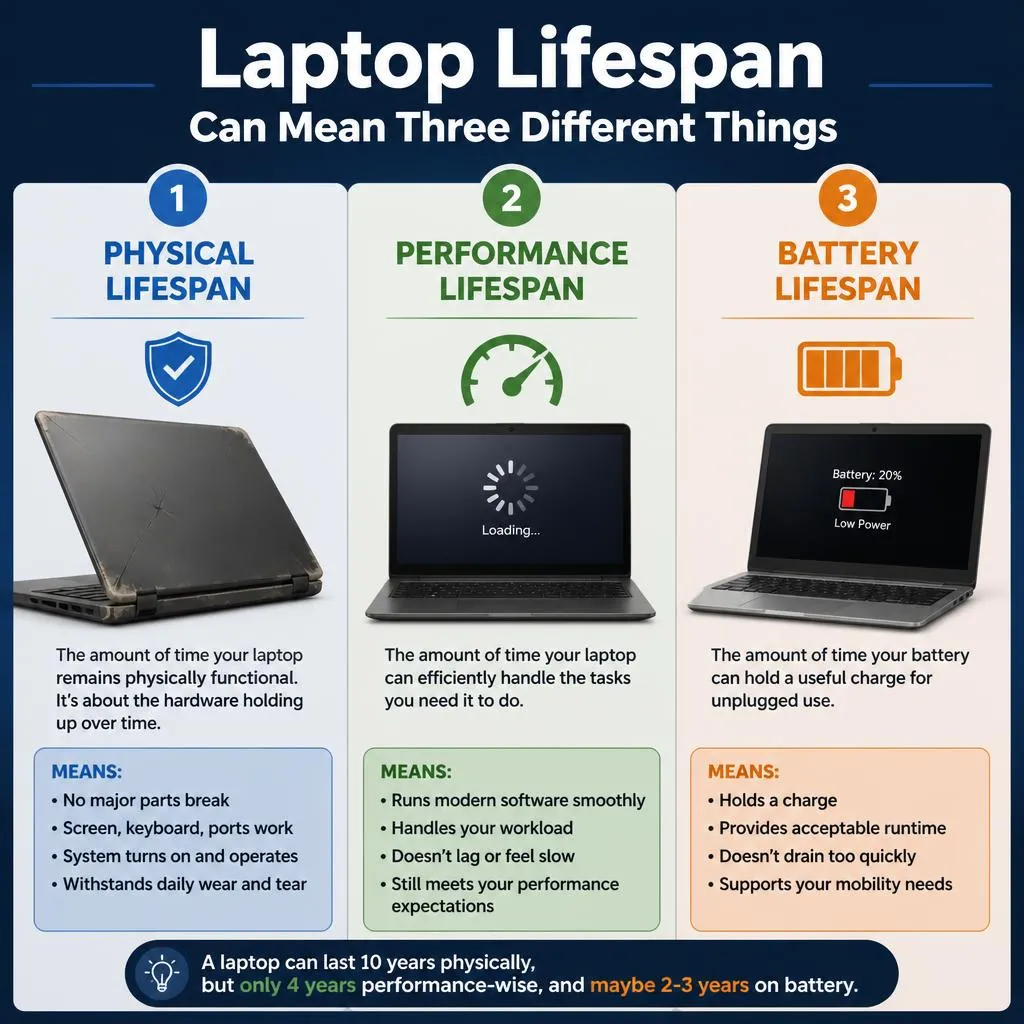
Physical Lifespan
Physical lifespan refers to how long the laptop continues to power on and function.
A Dell laptop may physically operate for seven to ten years if its motherboard, screen, storage drive, charging system, and cooling components remain functional. Some parts may need to be replaced during that period.
Performance Lifespan
Performance lifespan refers to how long the laptop can complete your normal work at an acceptable speed.
A laptop may still work but feel outdated because it has:
- Insufficient RAM
- A slow hard disk drive
- An older processor
- Weak integrated graphics
- Limited storage
- Poor support for modern applications
For most users, performance limitations become noticeable before total hardware failure.
Battery Lifespan
A laptop battery is a consumable component. It normally loses capacity much earlier than the rest of the computer.
Dell states that many users may notice reduced battery runtime after approximately 18 to 24 months, while power users may see a reduction sooner. Battery aging is influenced by charge cycles, temperature, usage patterns, and storage conditions.
A weak battery does not necessarily mean the entire laptop needs to be replaced. Installing a compatible replacement battery can restore portability if the rest of the computer is still in good condition.
How Long Do Different Dell Laptop Models Last?
Dell offers laptops for different budgets and workloads, so their expected useful lives are not identical.
Dell’s current product guide includes Dell laptops, XPS, Alienware, Dell Pro, Dell Pro Essential, Dell Pro Precision, and Dell Pro Education and Rugged devices. Older names such as Inspiron, Latitude, and Precision also remain widely used.
How Long Does a Dell Inspiron Last?
A Dell Inspiron usually remains useful for approximately three to five years, depending on its configuration and workload.
Inspiron includes both affordable and higher-specification models. A basic Inspiron with limited RAM and storage may become slow sooner, especially if it is used for gaming, editing, or heavy multitasking. A better-equipped model with an SSD, sufficient RAM, and a capable processor may remain practical for longer.
An older Inspiron can often receive a noticeable performance improvement from:
- Replacing a hard disk drive with an SSD
- Increasing the RAM
- Reinstalling or cleaning up Windows
- Replacing a weak battery
- Cleaning the cooling system
How Long Does a Dell XPS Last?
A Dell XPS can often remain useful for five to seven years when maintained properly.
XPS laptops are generally positioned as premium devices and are often purchased with stronger processors, high-quality displays, fast SSD storage, and better construction than entry-level systems.
However, thin premium laptops require good heat management. Blocked air vents, dust buildup, and sustained high temperatures can reduce performance and place additional stress on internal components.
Some XPS models also have soldered memory, which means the RAM cannot be upgraded later. Selecting enough memory at the time of purchase can therefore affect long-term usability.
How Long Does a Dell Latitude or Dell Pro Laptop Last?
A Dell Latitude or equivalent Dell Pro business laptop can often remain useful for five to seven years or longer.
Business laptops are designed for regular workplace use and may offer stronger construction, practical ports, serviceability, security features, and longer business support than basic consumer devices.
A Latitude or Dell Pro laptop with a capable processor, sufficient RAM, and replaceable storage may continue handling office work, web applications, accounting software, video meetings, and remote work for many years.
How Long Does a Dell Precision or Dell Pro Precision Last?
A Dell Precision or Dell Pro Precision mobile workstation may provide five to eight years of useful service, depending on the software it needs to run.
These systems are built for professional applications such as:
- Computer-aided design
- Engineering software
- 3D modeling
- Scientific computing
- Video production
- Architecture
- Data analysis
The physical hardware may last many years, but demanding professional software can shorten its practical lifespan. A workstation that remains excellent for office tasks may become too slow for the latest rendering, simulation, or editing software.
How Long Does an Alienware or Dell Gaming Laptop Last?
An Alienware or Dell gaming laptop may remain physically functional for four to seven years, but its practical lifespan for modern gaming is often closer to three to six years.
Gaming laptops face several challenges:
- Sustained heat
- High CPU and GPU usage
- Rapidly increasing game requirements
- Limited graphics upgrade options
- Faster battery wear
- More dust moving through the cooling system
A gaming laptop may remain usable longer when you reduce graphics settings, limit unnecessary background applications, clean the fans, and maintain safe operating temperatures.
How Long Do Dell Rugged Laptops Last?
Dell Rugged laptops are designed for environments where ordinary consumer laptops may be exposed to vibration, dust, frequent travel, or demanding field conditions.
Their reinforced construction can help them survive physical use for longer. However, they are still affected by battery aging, storage wear, software requirements, heat, and accidental damage.
How Long Will a Dell Laptop Last for Different Uses?
The same laptop can have a different useful lifespan depending on what its owner expects it to do.
Basic Browsing and Home Use
A reasonably configured Dell laptop may remain useful for five to seven years for:
- Web browsing
- Online shopping
- Streaming
- Social media
- Basic document editing
Light workloads place less pressure on the processor and graphics hardware.
School and College Work
A student laptop may provide four to six years of useful service if it has sufficient RAM, SSD storage, and a processor capable of running the required applications.
Students using engineering, architecture, animation, or programming tools may need stronger hardware than students mainly working with documents and web-based learning platforms.
Office and Remote Work
A good Dell business laptop can often serve office users for five to seven years.
Its useful life may be shorter if the user works with very large spreadsheets, complex databases, multiple monitors, intensive video meetings, or specialized corporate software.
Programming and Software Development
A Dell laptop used for programming may last four to seven years, depending on the development environment.
Basic web development is less demanding than running multiple virtual machines, mobile emulators, local databases, containers, and large software builds.
RAM capacity and processor performance are especially important for developers.
Photo and Video Editing
A laptop used for professional editing may feel outdated within three to five years, even if it remains physically reliable.
High-resolution video, newer codecs, AI-assisted editing tools, and complex effects can quickly increase hardware requirements.
Gaming
A Dell gaming laptop may provide acceptable modern gaming performance for around three to five years before the user needs to reduce resolution, texture quality, ray tracing, or other graphical settings.
The laptop can continue serving lighter games and everyday computing after it no longer meets the requirements of new high-end titles.
CAD, 3D Rendering, and Engineering
A Dell Precision workstation may remain productive for four to seven years, but the practical lifespan depends heavily on project size and software requirements.
Professional users may replace a functional laptop earlier because reducing render times or improving simulation performance has a direct financial value.
What Affects the Lifespan of a Dell Laptop?
No single factor determines how long a Dell laptop will last. Several conditions work together.
Original Hardware Specifications
A laptop purchased with only the minimum required specifications can become outdated sooner.
For better long-term usability, the most important specifications include:
- Processor performance
- RAM capacity
- SSD capacity
- Graphics capability
- Cooling design
- Display quality
- Upgradeability
A strong processor and sufficient memory usually provide more long-term value than selecting the cheapest available configuration.
Build Quality
Premium, business, workstation, and rugged laptops may use stronger hinges, chassis materials, keyboards, and internal structures than basic consumer models.
However, product category alone does not guarantee durability. Individual models can differ significantly.
Daily Workload
Demanding work creates more heat and may expose the cooling system, battery, and power components to heavier use.
Common high-load activities include:
- Gaming
- Video rendering
- 3D modeling
- Running virtual machines
- Data processing
- Software compilation
- AI applications
Heat and Ventilation
Heat is one of the biggest threats to long-term laptop reliability.
Using a laptop on a bed, blanket, sofa, or other soft surface may block its air intake. Dust can also accumulate in the fans and heat sinks, reducing cooling efficiency.
Frequent overheating can cause:
- Performance throttling
- Unexpected shutdowns
- Faster battery degradation
- Fan wear
- Reduced component stability
Use the laptop on a hard, flat surface and keep its vents unobstructed.
Charging Habits
Lithium-ion batteries lose capacity gradually with age and charge cycles. Extreme heat and unsuitable chargers can accelerate this process.
Battery wear does not usually damage the entire laptop, but it can reduce portability and eventually cause unexpected shutdowns.
Physical Handling
Drops, liquid spills, pressure inside a bag, aggressive lid opening, and cable strain can shorten a laptop’s life.
Common physical failures include:
- Broken hinges
- Cracked displays
- Loose charging ports
- Damaged USB ports
- Missing keyboard keys
- Bent chassis sections
Maintenance
A neglected laptop may overheat, become slow, or develop preventable problems.
Regular software updates, storage cleanup, fan maintenance, malware protection, and battery checks can extend its useful life.
How to Estimate How Much Longer Your Dell Laptop Will Last
There is no exact test that predicts a laptop’s remaining lifespan, but you can make a practical estimate by checking its age, performance, hardware condition, and support status.
| Laptop condition | Recommended action |
|---|---|
| Runs smoothly and receives updates | Continue using it |
| Battery is weak but performance is good | Replace the battery |
| Slow because of an HDD or limited RAM | Consider an SSD or RAM upgrade |
| Runs hot because of dust | Clean and inspect the cooling system |
| Cannot run required software | Consider upgrading or replacing it |
| Has repeated motherboard or display problems | Compare repair and replacement costs |
| Has multiple expensive failures | Replacement may be more economical |
| No longer receives essential security support | Replace or repurpose it |
Ask yourself these questions:
- Does the laptop complete your normal work without excessive delays?
- Does it still support the operating system and software you need?
- Is its battery health acceptable?
- Does it overheat or shut down unexpectedly?
- Are the hinges, keyboard, display, and charging port in good condition?
- Have repair costs increased during the last year?
- Can additional RAM or an SSD solve the main problem?
A laptop that is still secure, stable, and capable of handling your work does not need to be replaced simply because it is several years old.
How to Check the Age of Your Dell Laptop
Knowing your laptop’s age can help you estimate its remaining useful life.
Find the Service Tag
Dell laptops normally have a unique Service Tag. Depending on the model, you may find it:
- On a label underneath the laptop
- Inside the BIOS or UEFI
- In Dell SupportAssist
- Through Windows commands
- On the original packaging or invoice
Check Warranty Information
Enter the Service Tag on Dell’s support and warranty page to view available warranty information and the warranty expiration date. Dell confirms that its warranty lookup can identify coverage by Service Tag or automatic device detection.
The warranty date can help estimate the laptop’s age, although it may not always provide the exact manufacturing date.
Check the BIOS
Restart the laptop and repeatedly press F2 when the Dell logo appears. Look for system information such as:
- Model
- Service Tag
- BIOS version
- Processor
- Installed memory
The BIOS release date is not necessarily the laptop’s manufacture date because the BIOS may have been updated.
Check the Original Receipt
The purchase receipt, order confirmation, or invoice usually provides the most reliable date for determining how long you have owned the laptop.
Do not rely only on the Windows installation date. Windows may have been reinstalled, reset, or upgraded after the laptop was purchased.
How Long Does a Dell Laptop Battery Last?
A Dell laptop battery normally loses capacity before the rest of the computer reaches the end of its useful life.
Dell says many users may notice shorter battery runtime after 18 to 24 months. Heavy users may notice a reduction sooner. This does not mean every battery will fail at that point; it means gradual capacity loss becomes noticeable for many users.
Battery lifespan depends on:
- Battery age
- Charge cycles
- Operating temperature
- Screen brightness
- Charging settings
- Workload
- Storage conditions
- Battery quality
Signs That a Dell Battery Needs Replacement
Consider checking or replacing the battery when:
- Runtime has become much shorter
- The laptop shuts down unexpectedly
- The charge percentage drops suddenly
- The laptop works only when connected to power
- The BIOS reports Fair or Poor battery health
- The battery does not charge properly
- The battery is physically swollen
Stop using the laptop and seek qualified assistance if the battery is swollen. Do not press, puncture, or continue charging a visibly damaged battery.
How to Check Dell Laptop Battery Health
Dell provides several battery-health methods.
Check Through the BIOS
- Restart the laptop.
- Press F2 repeatedly when the Dell logo appears.
- Find the Battery Health or Battery Information section.
- Review the reported condition.
Create a Windows Battery Report
- Open Command Prompt.
- Enter
powercfg /batteryreport. - Press Enter.
- Open the generated HTML report.
- Compare Design Capacity with Full Charge Capacity.
Dell’s support guidance also allows battery health to be checked through BIOS or UEFI, onboard diagnostics, Dell Power Manager, and Dell Optimizer on supported systems.
How Long Does a Dell Laptop Last on a Full Charge?
Battery runtime per charge is different from battery lifespan in years.
A Dell laptop may last anywhere from a few hours to most of a working day, depending on its model, battery capacity, configuration, settings, and workload. Manufacturer battery claims are normally based on controlled tests and may not match every user’s real-world experience.
Activities that reduce runtime include:
- Gaming
- Video editing
- Rendering
- High display brightness
- High refresh rates
- Multiple background applications
- Video calls
- External devices
- Maximum-performance power settings
To improve runtime:
- Reduce screen brightness
- Use a balanced or battery-saving power mode
- Lower the display refresh rate when appropriate
- Close unnecessary background applications
- Turn off unused keyboard lighting
- Disconnect unused USB devices
- Keep Windows, drivers, and BIOS updated
- Replace an aged battery when necessary
Is It Okay to Leave a Dell Laptop Plugged In?
Using a Dell laptop while it is charging is normal. Dell states that using the laptop while charging is safe, provided that the device has adequate ventilation. Dell also recommends using the laptop on battery occasionally rather than keeping it connected continuously in every situation.
The main concerns are battery aging and excessive heat, not simply the fact that the charger is connected.
For a laptop used mainly at a desk:
- Keep the vents clear
- Avoid placing it on soft materials
- Use Dell-supported battery charging settings when available
- Avoid prolonged exposure to high temperatures
- Use the correct charger
- Check battery health periodically
Some Dell models provide charging modes or custom thresholds through BIOS, Dell Power Manager, or Dell Optimizer. Available options vary by model.
Signs Your Dell Laptop Is Reaching the End of Its Useful Life
A laptop does not need replacement because of one minor problem. Several problems occurring together are more meaningful.
It Remains Slow After Optimization
If the laptop is still extremely slow after removing unnecessary programs, checking for malware, freeing storage, and reinstalling Windows, the hardware may no longer meet your needs.
It Frequently Overheats
Constant overheating after the fans and air passages have been cleaned may indicate a failing fan, degraded thermal material, or another cooling problem.
It Cannot Run Required Software
Replacement may be necessary when the laptop cannot support the operating system, applications, or security tools required for your work.
Repairs Are Becoming Frequent
Repeated battery, hinge, keyboard, display, fan, storage, or charging problems may make continued repair uneconomical.
Replacement Parts Are Difficult to Find
Parts for older models may become expensive or unavailable. Third-party parts can vary in quality and compatibility.
The Battery and Charging System Keep Failing
Replacing one battery can be worthwhile. Repeated charging failures combined with motherboard or charging-port problems may justify replacing the laptop.
It Is No Longer Reliable
A computer used for work, study, or business must be dependable. Frequent crashes, corrupted files, startup failures, or random shutdowns can create more cost than the laptop’s replacement price.
Can Upgrading a Dell Laptop Extend Its Lifespan?
Yes. The right upgrade can extend a Dell laptop’s useful life, but upgrade options depend on the model.
Replace an HDD With an SSD
An SSD can dramatically improve:
- Startup speed
- Application loading
- File transfers
- System responsiveness
- Multitasking
This is often the most effective upgrade for an older laptop that still uses a mechanical hard drive.
Add More RAM
Additional RAM may improve performance when the laptop slows down while multiple applications or browser tabs are open.
Before purchasing memory, check:
- Maximum supported capacity
- Memory type
- Number of available slots
- Whether the RAM is soldered
- Dell’s service documentation
Replace the Battery
A replacement battery can restore portable use if the laptop performs well while connected to power.
Clean or Repair the Cooling System
Cleaning dust, replacing a failing fan, and properly servicing the cooling system can reduce heat-related performance problems.
Upgrade Storage Capacity
A larger SSD can extend the laptop’s usefulness when limited storage is the main problem.
Know When an Upgrade Will Not Help
An upgrade may not be worthwhile when:
- The processor is too old for required software
- The graphics processor cannot handle your workload
- The motherboard is failing
- The screen and hinges also require expensive repairs
- The laptop lacks necessary security support
- Several major parts are failing together
Most laptop processors and graphics chips cannot be practically upgraded.
Is It Worth Repairing an Old Dell Laptop?
The answer depends on the repair cost, laptop specifications, physical condition, and your performance requirements.
Repairs That Are Often Worth Considering
The following repairs can be economical when the rest of the laptop is healthy:
- Battery replacement
- SSD replacement
- RAM upgrade
- Fan replacement
- Keyboard replacement
- Operating-system reinstall
- Charger replacement
- Minor charging-port repair
Repairs That May Not Be Worth the Cost
Replacement may be a better option when the laptop has:
- Major motherboard damage
- Severe liquid damage
- A broken display and damaged hinges
- Multiple simultaneous failures
- Unsupported hardware
- Very weak specifications
- Repeated repair history
A useful rule is to compare the total repair cost with the price of a replacement that meaningfully improves performance. Do not spend heavily repairing an old laptop if it will still be too slow for your needs afterward.
How Long Does a Used or Refurbished Dell Laptop Last?
A used Dell laptop may provide anywhere from one to five or more additional years of service. Its remaining life depends more on condition and specifications than on its label.
A professionally refurbished laptop may have been tested, cleaned, repaired, and sold with a warranty. A privately sold used laptop may not have received the same inspection.
Before buying, check:
- Original model and approximate age
- Processor generation
- RAM capacity
- SSD health and capacity
- Battery health
- Display condition
- Hinge strength
- Keyboard and trackpad
- USB, HDMI, audio, and charging ports
- Webcam and speakers
- BIOS lock status
- Charger condition
- Warranty or return policy
Avoid buying an inexpensive laptop that is already too weak for your intended software.
How Long Does Dell Support a Laptop?
Laptop lifespan and warranty coverage are different.
A Dell laptop may continue working long after its warranty expires. Warranty length varies by model, country, seller, and support plan.
For products purchased in the United States or Canada, Dell notes that limited hardware warranties may vary from 90 days to several years, and the applicable period should be checked on the invoice, receipt, or warranty documentation. Dell also notes that a standard portable battery commonly carries a base one-year limited hardware warranty, although options can differ by product and region.
Use the Service Tag to check:
- Current warranty status
- Warranty expiration date
- Available support options
- Driver downloads
- BIOS updates
- Device documentation
- Replacement-part information
Software support also depends on the operating system and hardware requirements. A laptop may be mechanically sound but unsuitable for continued sensitive use if it cannot receive essential security updates.
Can a Dell Laptop Last 10 Years?
Yes, a Dell laptop can physically last ten years, but it may require maintenance and replacement components.
A ten-year-old Dell may still handle:
- Basic documents
- Light web browsing
- Media playback
- Offline applications
- Simple home tasks
However, it may have:
- A weak or unusable battery
- Limited RAM
- Slow storage
- An outdated processor
- Poor support for modern software
- Limited security updates
- Worn hinges or keyboard components
- Difficulty finding replacement parts
A ten-year-old laptop should not automatically be discarded, but it may be better used as a backup or secondary device rather than a primary work computer.
How to Make a Dell Laptop Last Longer
Use the following practices to extend the lifespan of your laptop.
Keep It Cool
Use the laptop on a hard, flat surface. Do not block the vents with bedding, clothing, cushions, or papers.
Clean the Vents
Remove external dust carefully. More advanced internal cleaning should be performed only if you understand the service procedure or use a qualified technician.
Keep Software Updated
Install appropriate Windows, driver, application, firmware, and BIOS updates. Follow Dell’s instructions carefully when updating the BIOS.
Use the Correct Charger
Use the original Dell charger or a compatible charger that meets the laptop’s required specifications.
Avoid Liquid and Physical Pressure
Keep drinks away from the laptop. Use a padded bag, and do not place heavy objects on top of it.
Open the Screen Carefully
Open the lid from the center when possible. Repeatedly pulling from one corner can place uneven stress on the hinges.
Maintain Free Storage Space
A nearly full system drive can reduce performance. Remove unnecessary files and maintain a reliable backup.
Check Battery Health
Review the battery condition every few months or whenever runtime declines significantly.
Upgrade Before Replacing
A suitable SSD, RAM, or battery upgrade may extend the laptop’s useful life at a lower cost than buying a new system.
Back Up Important Files
No laptop lasts forever. Keep important files in more than one secure location so that hardware failure does not cause permanent data loss.
What Can You Do With an Old Dell Laptop?
A laptop that no longer meets your primary needs may still be useful.
You can:
- Keep it as an emergency backup
- Use it for simple documents
- Turn it into a media device
- Use it for basic learning projects
- Donate it after securely removing personal data
- Sell it for parts
- Recycle it through an appropriate electronics program
Before selling, donating, or recycling the device, back up your files, sign out of accounts, remove encryption recovery information where appropriate, and securely erase the storage drive.
Frequently Asked Questions
How many years does a Dell laptop usually last?
Most Dell laptops remain useful for approximately three to five years. Premium, business, and workstation models may remain useful for five to seven years or longer when properly maintained.
Is a five-year-old Dell laptop still good?
A five-year-old Dell laptop can still be good if it runs supported software, remains reliable, has adequate specifications, and handles your normal workload without serious delays.
Which Dell laptop series lasts the longest?
Business, workstation, and rugged systems generally provide better long-term serviceability and durability than basic entry-level models. However, specifications, maintenance, and individual model design matter more than the name alone.
How long does a Dell Inspiron laptop last?
A Dell Inspiron commonly remains useful for around three to five years. A higher-specification Inspiron may last longer, while a basic model used for demanding work may feel outdated sooner.
How long does a Dell XPS laptop last?
A well-maintained Dell XPS may remain useful for approximately five to seven years. Its practical lifespan depends on the original specifications, thermal condition, workload, and whether important components can be upgraded.
How long does a Dell laptop battery last?
Many users may notice reduced battery runtime after approximately 18 to 24 months, although the battery may remain usable for longer. Heavy use, heat, and frequent charge cycles can accelerate capacity loss.
How do I find out how old my Dell laptop is?
Locate the Service Tag and check the device’s warranty information through Dell Support. You can also review the original receipt, invoice, packaging, or purchase history.
Is it okay to leave a Dell laptop plugged in all the time?
Using a Dell laptop while charging is normal. Keep it properly ventilated, use supported charging settings when available, and allow occasional battery use according to Dell’s guidance.
Can replacing the battery extend a Dell laptop’s life?
Yes. Replacing a worn battery can restore portability when the processor, storage, display, keyboard, and other components are still in good condition.
Does installing an SSD make an old Dell laptop last longer?
An SSD does not change the age of the processor or other components, but it can significantly improve responsiveness and extend the laptop’s practical usefulness.
Is a six-year-old Dell laptop worth repairing?
It may be worth repairing when the problem is limited to an affordable component such as the battery, SSD, RAM, fan, or keyboard. Expensive motherboard repairs may not be worthwhile if the laptop also has outdated specifications.
Why is my Dell laptop getting slower with age?
Common causes include limited RAM, a slow or failing storage drive, insufficient free space, overheating, excessive startup applications, outdated software, malware, and increased requirements from modern applications.
Final Verdict
A Dell laptop generally lasts three to five years, while a well-maintained premium, business, or workstation model may remain useful for five to seven years or longer.
The battery will normally show noticeable wear before the whole laptop reaches the end of its life. A battery, SSD, RAM, or cooling-system upgrade can often extend the useful life of an otherwise reliable computer.
Replace your Dell laptop when it can no longer run the software you need securely, becomes unreliable, suffers repeated expensive failures, or costs too much to repair relative to a suitable replacement. Until then, proper cooling, careful handling, regular maintenance, and sensible upgrades can help you get several productive years from it.

“Electronics aren’t just gadgets. They’re the invisible threads that connect our work, our play, and our world.”
I’m Julian Reed, and my obsession with tech started at age twelve, when I soldered a defunct gaming console back to life in my bedroom. That tiny green screen taught me that technology isn’t just a black box, it’s a tool you can master.
After fifteen years as a hardware engineer and a decade reviewing consumer tech, I’ve joined this team to cut through the jargon. Whether you’re building a high-end home theater or just need a laptop that won’t lag, I’m here to help you choose the gear that truly powers your life.


