
Choosing the right amount of RAM for a gaming laptop can be confusing. Some laptops come with 8GB of memory, others offer 16GB or 32GB, and high-end models may include 64GB or more. But does spending extra money on RAM actually improve your gaming experience?
For most people buying a gaming laptop, 16GB of RAM is a practical starting point, while 32GB is a better choice for heavy multitasking, streaming, and demanding workloads. An 8GB laptop can still run some games, but it offers less room for modern games and background applications. Meanwhile, 64GB is usually unnecessary if you mainly play games.
The right amount depends on the games you play, your laptop’s processor and graphics card, the applications you keep open, and whether you plan to upgrade later.
In this guide, you will learn how much RAM a gaming laptop needs, whether 12GB or 16GB is enough, when 32GB makes sense, and how to avoid spending money on memory you may never use.
Quick Answer: How Much RAM Does a Gaming Laptop Need?
Here is a simple breakdown to help you choose.
| RAM Capacity | Best For | Buying Recommendation |
|---|---|---|
| 8GB | Older games, lightweight games, and basic use | Acceptable for limited budgets, but restrictive for many modern games |
| 12GB | Selected games and entry-level configurations | Consider it only after checking game requirements and RAM configuration |
| 16GB | Mainstream gaming and everyday multitasking | A sensible starting point for most gaming laptop buyers |
| 32GB | Demanding games, streaming, mods, and heavier multitasking | A strong choice for users who need more memory headroom |
| 64GB or more | Professional creative work and specialised applications | Usually unnecessary for gaming alone |
My recommendation: Start with 16GB if your main goal is gaming on a reasonable budget. Choose 32GB if you regularly stream, edit videos, use demanding applications alongside games, or want extra room for memory-intensive workloads.
Before making a final decision, check the system requirements for your favourite games and the memory specifications of the exact laptop model.
How Much RAM Do You Need for Different Types of Gaming?
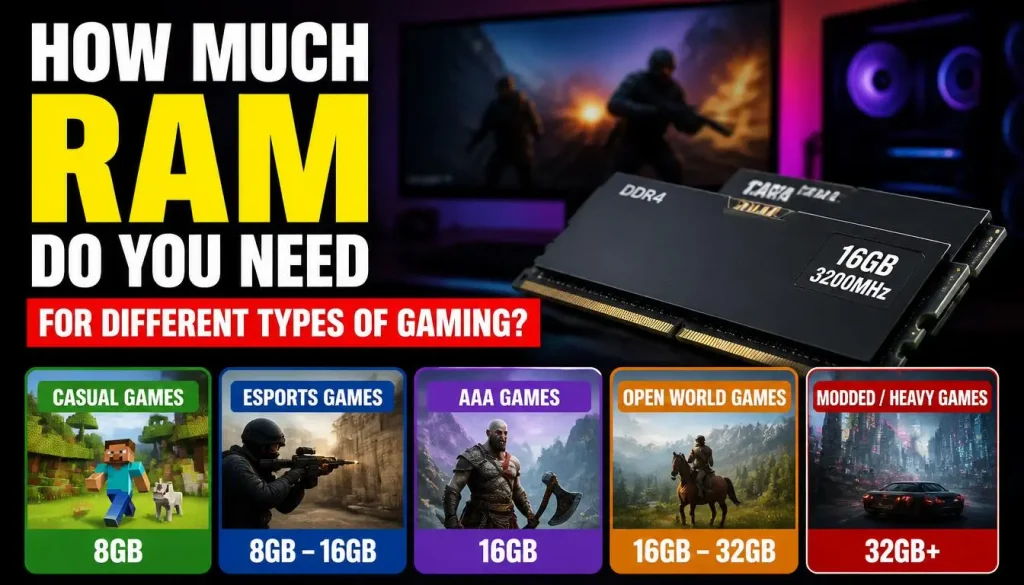
Not every gamer needs the same amount of memory. A laptop used for older games has different requirements from one running demanding new releases while recording gameplay.
Is 8GB RAM Enough for Gaming?
Yes, 8GB RAM can run some PC games, particularly older titles, lightweight games, and games with modest system requirements. However, it is not the safest choice if you are buying a gaming laptop that you expect to use for several years.
Windows, background applications, launchers, voice-chat software, and the game itself all compete for available memory. When memory becomes insufficient, the system may rely more heavily on storage to manage data, potentially contributing to stuttering and slower responsiveness.
Consider 8GB only if you play less demanding games, have a strict budget, and have confirmed that your chosen games can run acceptably on that configuration.
If you are comparing budget models, read our guide to choosing a gaming laptop before deciding which specifications deserve your money.
Is 12GB RAM Good for Gaming?
Twelve gigabytes can be enough for certain games, but it is not automatically the best value.
For example, the official Cyberpunk 2077 PC system requirements list 12GB for the minimum non-ray-tracing configuration and 16GB for the recommended configuration on that published requirements page. Actual performance also depends on the processor, graphics card, settings, and game updates.
A 12GB configuration may work well for a particular game, but it leaves less room than 16GB for additional applications and heavier workloads.
Before buying a 12GB laptop, check whether the memory is installed as 8GB plus 4GB, uses another arrangement, or is soldered onto the motherboard. Configuration and upgrade options can affect its long-term value.
If the price difference between comparable 12GB and 16GB models is small, I would generally favour the 16GB option for a new gaming laptop.
Is 16GB RAM Enough for Most Games?
For many gamers, yes. Sixteen gigabytes offers a sensible balance between price and usable memory for mainstream gaming.
It can support many modern games while leaving room for everyday activities such as browsing the web, listening to music, and using voice chat. However, the amount of memory available to the game will depend on what else is running.
The official Fortnite PC system requirements list 8GB as the minimum and 16GB or higher as the recommended memory capacity. This is a useful example of why minimum requirements should not be confused with a recommended configuration.
Sixteen gigabytes is a good place to start if you primarily play games and do not routinely run several demanding applications at once.
When Should You Choose 32GB RAM?
Choose 32GB if your typical gaming session involves more than just running a game.
It can be especially useful when you:
- Play demanding games while keeping several browser tabs open.
- Stream gameplay or record footage while playing.
- Use large game mods or memory-intensive add-ons.
- Edit videos or work with large creative projects.
- Run virtual machines, development tools, or other demanding applications alongside games.
Intel’s gaming laptop buying guide also explains how memory requirements vary with the games and applications you use.
Remember that 32GB does not automatically double your frame rate compared with 16GB. The benefit depends on whether your current memory capacity is limiting performance.
Is 64GB RAM Overkill for Gaming?
For most gaming-only users, 64GB is more than necessary.
It may make sense if you combine gaming with professional video editing, complex creative work, virtual machines, or other applications that can use substantial amounts of memory.
If you mainly play games, browse the internet, and use Discord, spending extra money on 64GB may provide little practical benefit compared with choosing a stronger graphics card, a better display, or a laptop with more suitable cooling.
The better purchase is the one that improves your actual experience, not the one with the biggest number on the specification sheet.
16GB vs. 32GB RAM: Which Is Better for a Gaming Laptop?
Both configurations can be good choices. The important question is whether your typical workload benefits from the additional capacity.
| Factor | 16GB RAM | 32GB RAM |
|---|---|---|
| Mainstream gaming | Often sufficient | More memory headroom |
| Gaming with a few background apps | Generally suitable | More room for demanding multitasking |
| Streaming while gaming | Depends on the software and workload | More comfortable for many setups |
| Video editing alongside gaming | May be restrictive for larger projects | Better suited to heavier projects |
| Initial purchase cost | Usually lower | Usually higher |
| Best reason to choose it | Value-focused gaming | Heavier multitasking and demanding workloads |
Does More RAM Increase FPS?
Sometimes, but only when memory capacity or configuration is limiting performance.
If a laptop is running short on RAM, increasing capacity can reduce memory pressure and may improve frame-time consistency or reduce stuttering. In some circumstances, memory speed and channel configuration can also influence gaming performance.
However, if your system already has enough RAM, moving from 16GB to 32GB may make little difference to average FPS.
Gaming performance also depends on the GPU, CPU, graphics settings, drivers, and cooling system. A weak graphics card will not suddenly become powerful just because you install more RAM.
Before upgrading, identify the actual bottleneck rather than assuming every performance problem comes from memory.
Is It Better to Buy 16GB Now and Upgrade to 32GB Later?
This can be a sensible budget strategy, but only if the laptop supports memory upgrades.
Before choosing this approach, check the number of memory slots, the maximum supported capacity, whether any memory is soldered, and whether an upgrade would require removing the existing modules.
A laptop with 16GB of soldered RAM may not offer a practical upgrade path. In that situation, choosing 32GB when purchasing the laptop may be more sensible if you expect to need it.
How Much RAM Do Different Games Actually Need?
The easiest way to make a good decision is to check the official requirements for the games you intend to play.
| Game or Use Case | How to Approach the RAM Requirement |
|---|---|
| Older or lightweight games | Check the published minimum requirements; 8GB may be sufficient for some titles |
| Fortnite | Epic lists 8GB minimum and 16GB or higher recommended on its published requirements page |
| Cyberpunk 2077 | The cited official requirements list 12GB minimum and 16GB recommended for the specified non-ray-tracing configurations |
| Competitive online games | Check each game’s current requirements and consider what else runs in the background |
| Gaming while streaming | Allow additional memory for streaming software, voice chat, recording, and other open applications |
| Games with large mods | Check mod recommendations and monitor actual memory usage |
These are examples, not universal guarantees. Game requirements can change with updates, and a laptop needs suitable CPU and GPU performance as well as sufficient RAM.
Minimum vs. Recommended RAM: What Is the Difference?
Minimum RAM is the amount listed for a supported baseline configuration. It does not necessarily mean the game will deliver the best experience at high settings or while other applications are open.
Recommended RAM generally describes a more suitable target for the specified software experience, although actual performance still depends on the rest of the hardware.
When comparing gaming laptops, do not stop at the minimum requirement. Look at the recommended configuration and leave enough room for the way you actually use the computer.
What Affects Gaming Laptop RAM Requirements?
RAM capacity is only one part of the decision. Several other factors influence how much memory you need.
The Games You Play
Different games use memory differently. A lightweight indie game may need considerably less RAM than a large, detailed game with complex environments and many active assets.
Check official requirements for your most demanding games rather than choosing a configuration based on a single easy-to-run title.
Background Applications
A game does not have exclusive access to your laptop’s memory. Windows, browsers, Discord, launchers, recording tools, and other software may use RAM at the same time.
If you regularly multitask, 32GB can provide more flexibility than 16GB. If you close unnecessary applications while gaming, 16GB may be sufficient for your needs.
RAM Capacity vs. RAM Speed
Capacity determines how much data can be held in working memory. Speed and latency influence how quickly that data can be accessed.
More capacity helps when you are running out of memory. Faster compatible memory may help in some workloads, but the actual benefit depends on the processor, laptop design, and supported memory settings.
Do not buy RAM based on speed numbers alone. Confirm that the specific laptop supports the memory type and operating speed.
Single-Channel vs. Dual-Channel RAM
The memory configuration can also affect performance.
For example, a laptop with 2 × 8GB has 16GB across two modules, whereas 1 × 16GB has the same total capacity in one module. When the platform supports it, two appropriately configured modules can provide more memory bandwidth.
That difference can be particularly relevant to systems using integrated graphics, which use system memory. The exact performance improvement varies by hardware and game.
However, a two-module configuration is not automatically the best upgrade path for every laptop. Check the current configuration, available slots, supported memory channels, and future capacity needs.
System RAM vs. GPU VRAM
These are different types of memory, and confusing them can lead to poor buying decisions.
System RAM is used by Windows and running applications, including games.
VRAM, or video memory, is dedicated to storing graphics-related data on a discrete graphics card. A GPU with insufficient VRAM can struggle with certain graphics settings even when system RAM is available.
Increasing system RAM does not directly increase the physical VRAM capacity of a dedicated graphics card. Some integrated graphics systems share system memory, but that does not make system RAM and dedicated VRAM interchangeable.
When comparing laptops, check both system RAM and the graphics card’s memory specifications.
How to Tell If Your Gaming Laptop Needs More RAM
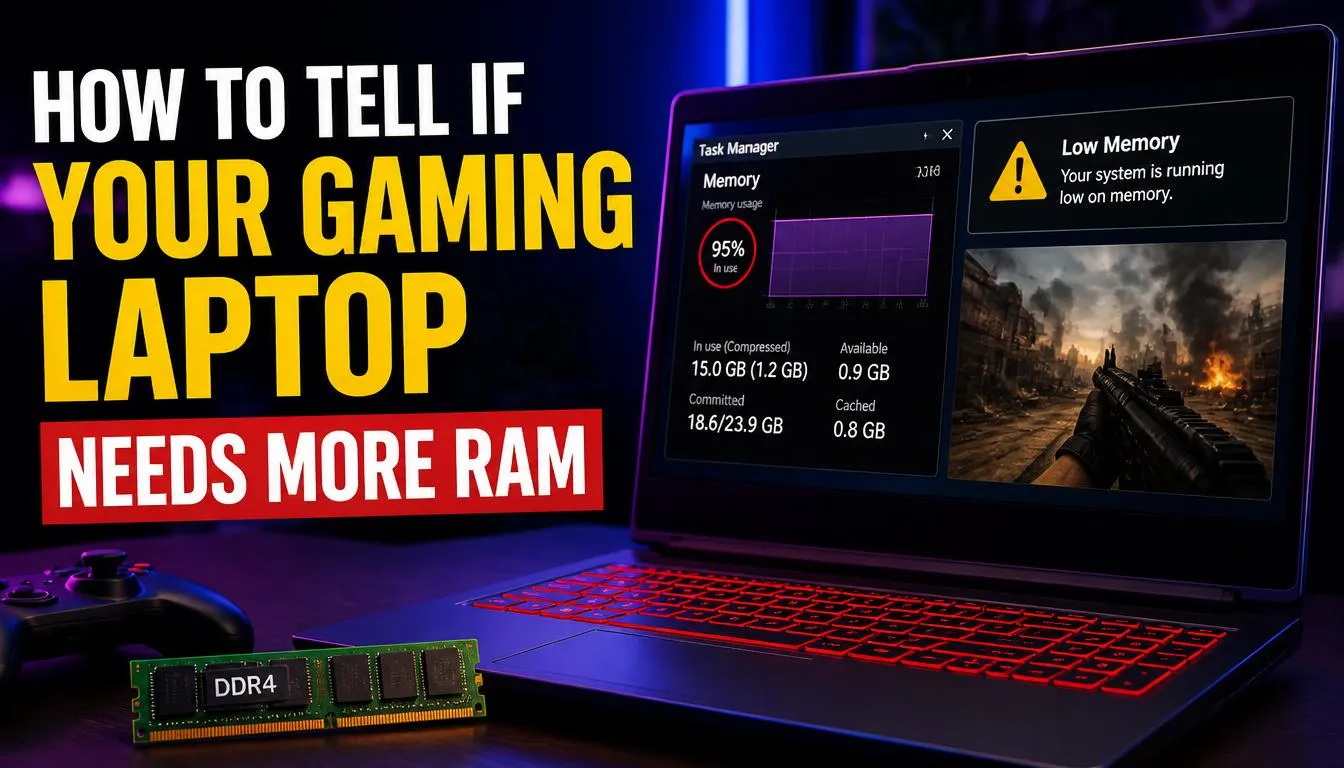
If your laptop stutters, freezes, or slows down during a game, insufficient RAM is one possible cause—but it is not the only one.
Look for a combination of symptoms rather than relying on one warning sign.
Common Signs of Memory Pressure
You may benefit from more RAM if:
- Games stutter while several applications are open.
- Switching between a game and other programs becomes unusually slow.
- Memory usage stays very high during your normal gaming workload.
- Closing background applications makes a noticeable difference.
- Demanding games struggle more when you use recording or streaming software at the same time.
Similar symptoms can result from overheating, a storage bottleneck, driver problems, or limited CPU and GPU performance. If you are experiencing broader performance problems, Microsoft’s Windows performance troubleshooting guide provides additional checks.
How to Check RAM Usage in Windows 11
You can check your installed memory and current memory usage without installing another application.
- Press Ctrl + Shift + Esc to open Task Manager.
- Select Performance in the sidebar.
- Choose Memory.
- Review the total installed memory, current usage, memory speed, and other available hardware details.
- Open your usual game and play under the conditions that normally cause problems.
- Check memory usage again while the game and your regular background applications are running.
Microsoft also explains how to use Task Manager and other Windows system tools to review system resource usage.
If memory usage remains high during your typical workload and closing unnecessary applications helps, additional RAM may be worth considering. A single high reading does not prove that you need an upgrade.
What Should You Check Before Buying or Upgrading RAM?
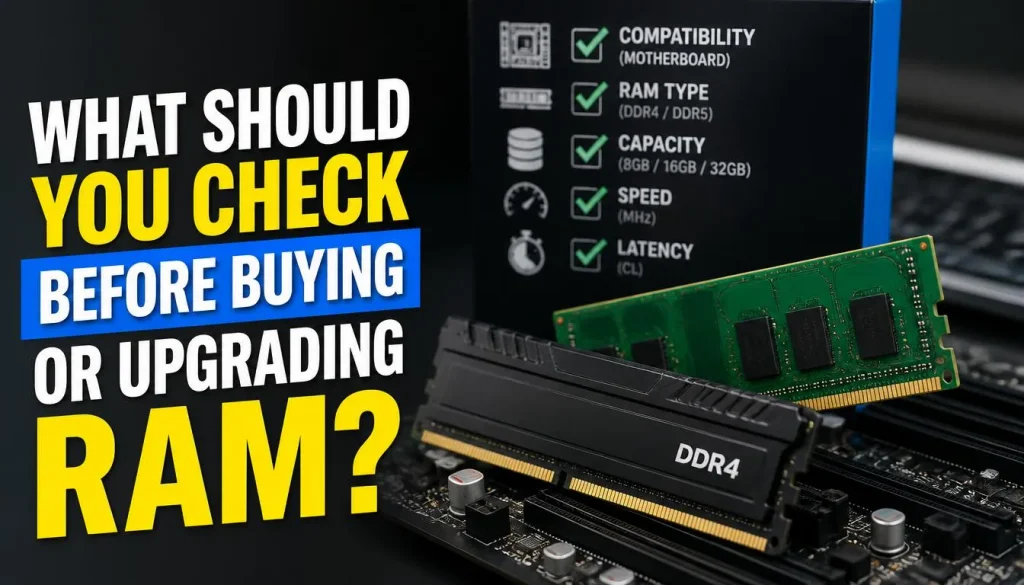
Buying compatible memory matters just as much as choosing the correct capacity.
Check Whether the RAM Is Upgradeable
Some gaming laptops have removable memory modules, while others use soldered memory that cannot be replaced through a normal RAM upgrade.
Find the exact laptop model and consult its official technical specifications or service manual. Do not assume that every model in a product series offers the same upgrade options.
Check the Memory Type and Maximum Capacity
Before purchasing an upgrade, confirm:
- Whether the laptop supports DDR4 or DDR5 memory.
- The supported module form factor, such as SO-DIMM.
- The maximum supported RAM capacity.
- The number of available memory slots.
- Supported memory speeds and configurations.
- Whether an upgrade requires replacing an existing module.
DDR4 and DDR5 modules are not interchangeable. The memory must match the laptop’s hardware requirements.
Compare the Upgrade Cost With the Price of a Higher-RAM Model
Sometimes upgrading later offers better value. In other cases, buying a laptop with 32GB installed from the beginning is more convenient or economical.
Compare the total cost, warranty conditions, upgrade compatibility, and the time you expect to keep the laptop.
For a detailed walkthrough, read our guide on how to upgrade RAM in a gaming laptop. It covers compatibility checks, supported configurations, installation, and post-upgrade checks.
How Much RAM Should You Buy on a Budget?
If you want to avoid overspending, decide how you will use the laptop before comparing configurations.
Choose 16GB for Mainstream Gaming
For many budget-conscious buyers, 16GB is a sensible place to start. It provides more headroom than 8GB without paying for memory that may not improve the experience.
Prioritise a balanced configuration that also has a suitable GPU, adequate CPU performance, an SSD, and effective cooling.
Choose 32GB if You Need More Headroom
Consider 32GB when you routinely run multiple demanding applications, stream gameplay, work with large creative projects, or play titles that benefit from additional memory.
It can also be a practical purchase if the price difference is small and you prefer not to open the laptop later. Just make sure the additional capacity fits your actual workload.
Avoid Paying Extra for Unused Capacity
A laptop with 64GB is not automatically a better gaming laptop than one with 32GB. The graphics card, processor, cooling, display, and total system configuration still matter.
If your budget is limited, compare the complete laptop rather than spending disproportionately on memory.
Our gaming laptop buying guide can help you evaluate RAM alongside the other specifications that influence gaming performance.
Common Gaming Laptop RAM Buying Mistakes
Avoid these common mistakes when choosing a new gaming laptop or upgrading your current one.
Buying based only on RAM capacity: A laptop with 32GB and a weak GPU may perform worse in games than a well-balanced 16GB system.
Ignoring game requirements: Check minimum and recommended requirements for the games you actually play.
Assuming more RAM always means more FPS: Extra capacity helps when memory is a limitation, but it is not a universal performance upgrade.
Confusing RAM with VRAM: System memory and graphics memory serve different purposes.
Ignoring upgradeability: Soldered memory and limited slots can affect your future options.
Buying incompatible memory: Check the exact laptop model, memory generation, capacity limit, and supported speed before purchasing modules.
Overlooking background applications: Unnecessary applications can consume available memory. Close what you do not need before assuming that an upgrade is the only solution.
Frequently Asked Questions About How Much RAM Do You Need for a Gaming Laptop
Is 16GB RAM enough for a gaming laptop in 2026?
For many gamers, 16GB remains a practical starting point for mainstream gaming and everyday multitasking. However, some demanding games and heavier workloads may benefit from 32GB. Always check the current requirements for your intended games.
Is 32GB RAM better than 16GB for gaming?
It provides more memory capacity and can help when a game or your background applications need more than 16GB can comfortably provide. If your normal workload already fits within 16GB, the difference in gaming performance may be small.
Can you game on a laptop with 8GB RAM?
Yes, some games can run on 8GB, particularly less demanding titles. But it can limit your options with modern games and multitasking. Check the game’s official requirements before buying an 8GB laptop for gaming.
Is 12GB RAM enough for gaming?
It can be enough for specific games and configurations. However, 16GB is generally a more flexible starting point for a new gaming laptop. Check recommended game requirements, background usage, and the laptop’s memory configuration before deciding.
Does more RAM increase FPS?
It can improve performance when insufficient memory is causing a bottleneck. But adding RAM to a system that already has enough will not necessarily increase FPS significantly. GPU, CPU, game settings, memory speed, and configuration also matter.
Is 64GB RAM necessary for gaming?
Usually not if gaming is your only demanding activity. It is more suitable for people who combine gaming with professional creative work, virtual machines, or other specialised memory-intensive tasks.
Is dual-channel RAM better for gaming?
Dual-channel memory can provide more memory bandwidth when supported by the laptop’s platform. It may improve performance in some games, especially on systems using integrated graphics. The size of the improvement depends on the hardware and workload.
Can I add more RAM to my gaming laptop?
Possibly. Some models have replaceable memory modules, while others use soldered RAM. Check the exact model’s technical specifications and service documentation before buying memory or opening the laptop.
Final Verdict: How Much RAM Should You Choose?
For most people buying a gaming laptop, 16GB RAM is a sensible starting point, while 32GB is worth considering for demanding games, streaming, and heavy multitasking. Eight gigabytes can still work for selected games, but it offers less room for demanding titles and background applications. Twelve gigabytes may be sufficient for some configurations, while 64GB is generally unnecessary for gaming alone.
Before making your purchase, check the games you want to play, the GPU and CPU in the laptop, and whether the RAM can be upgraded later. If you already own a gaming laptop, monitor memory usage under your normal workload before deciding to spend money on an upgrade.
The best choice is not necessarily the laptop with the most RAM. It is the one that gives you the performance you need without wasting your budget.

“Electronics aren’t just gadgets. They’re the invisible threads that connect our work, our play, and our world.”
I’m Julian Reed, and my obsession with tech started at age twelve, when I soldered a defunct gaming console back to life in my bedroom. That tiny green screen taught me that technology isn’t just a black box, it’s a tool you can master.
After fifteen years as a hardware engineer and a decade reviewing consumer tech, I’ve joined this team to cut through the jargon. Whether you’re building a high-end home theater or just need a laptop that won’t lag, I’m here to help you choose the gear that truly powers your life.


